
ALLYES
[2022년 청년친화형 기업 ESG지원 사업 - 4] 본문
일시 : 2022.09.08
시간 : 9:00 ~ 18:00
오전 : Database
점심시간
오후 : Java
오전 [Database]
[복습]
select distinct * column alias
- select list 절 - 보고자 하는 컬럼의 이름을 명시, 출력과 관련이 되어 있음
- distinct - 중복 제거, select 명령문 다음에 위치, 전체 명령문에서 한번만 사용 가능
- * - 테이블에 있는 모든 컬럼을 보고자 할 때 사용
- column - 특정 컬럼을 보고자 하면 컬럼 이름을 제시할 것, 여러 컬럼을 보고싶다면 ' , ' 을 같이 사용할 것
- 실행 순서 : from -> where -> select 절
alias -
- 출력이 되는 열 머리글을 변경 가능, (변경하고자하는)컬럼 다음에 위치, 1개의 컬럼당 1개의 alias 명
- as , space - 단일문장, 대문자 출력
- " " - 복수문장, 쓰여진 형식 그대로 출력(대소문자 구분)
산술 연산
- col + 상수
- col + col
- 숫자 데이터 가능
- 문자 데이터 불가능
- 날짜 데이터 + , - 만 가능
null -> null (산술 연산 불가능)
- 연산을 수행하고자 하면 nvl 사용
- nvl(col, 대체값)
from
- select문에 나오는 컬럼의 이름이 포함된 table_name을 명시
where
- 행을 제한을 하는 조건절
- 1. 조건식(문) => col 연산자 값
- ex) d_id = 90
- 2. 값을 명시 할 때 => 날짜/문자 ' '로 표기
- 3. 값을 명시 할 때 => 테이블의 저장 형식을 사용
[예습]
연본이 150000 이상인 사원의 이름과 연봉을 구하시오.
단 이름은 NAME, 연봉은 AnnSal로 출력하시오.
select last_name as name, salary*12 "AnnAsl"
from employees
where salary*12 >= 150000;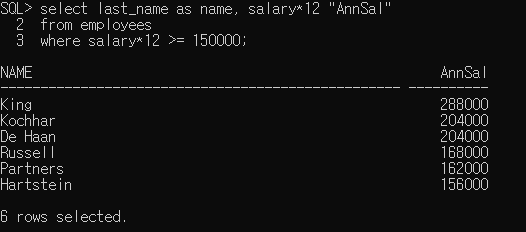
※ where 절에 ' where Annsal >= 150000' 에러가 뜹니다.
- 실행 순서 : from -> where -> select 절 순으로 진행 되기 때문에 AnnSal은 이름이 바뀌기 전 이므로 실행 x
| 연산자 | 의미 |
| BETWEEN ... AND .... | 두 값 사이(지정한 값 포함), 범위 값 |
| IN(set) | 값/목록 중의 값과 일치, 똑같은 여러개 값을 찾을때 (복수 연산자) |
| LIKE | 문자 패턴 일치 |
| IS NULL | 널 값 |
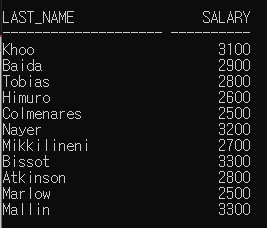
1. BETWEEN 조건
select last_name, salary
from employees
where salary between 2500 and 3500;
2. IN 조건
select employee_id, last_name, salary, manager_id
from employees
where manager_id in(100, 101, 201);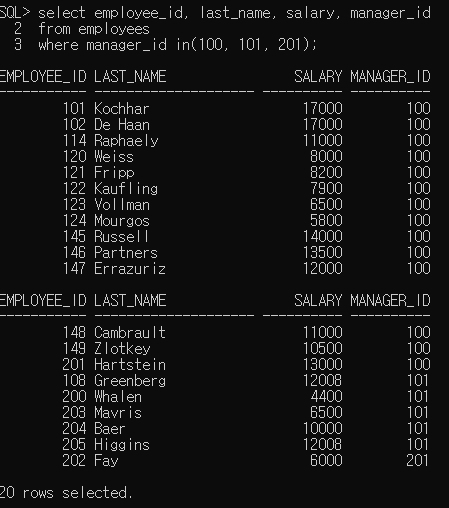
3. LIKE 조건
- % : 문장 전체
- ex) S% : S로 시작, %S : S로 끝나는 것, %S% : S가 포함되어있는 것을 출력
- _ : 문자 하나
select first_name
from employees
where first_name like 'S%';

// first_name이므로 성은 대문자로 찾아야함
// 's%'으로 조건을 걸 경우 결과 출력이 없음
select last_name, hire_date
from employees
where hire_date like '06%';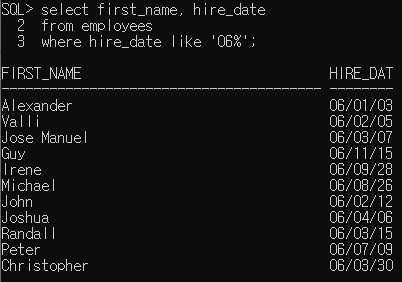
select last_name
from employees
where last_name like '_o%';

// 이름 = '김%' => 이름이 김%인 사람을 찾는 조건

4. IS NULL 조건
NULL을 찾는 조건
select last_name, manager_id
from employees
where manager_id is null;
# 문제 : 90번 부서에 근무하는 사원 중 급여가 15000이상인 사원의 이름과 급여를 출력하시오
// 조건을 여러개 사용하고 싶은 경우 and, or을 사용
select last_name, salary
from employees
where department_id = 90
and salary >= 15000;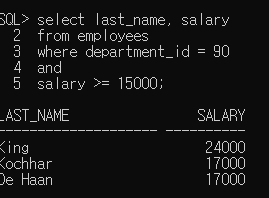
# AND, OR 연산자
반드시 조건식이 와야함
select employee_id, last_name, job_id, salary
from employees
where salary >= 10000
and job_id like '%MAN%';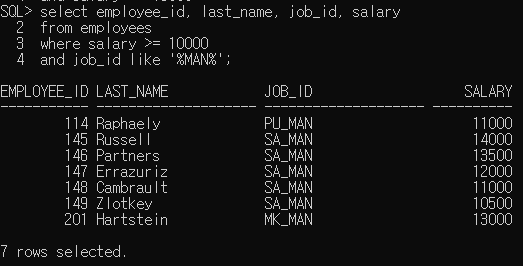
select employee_id, last_name, job_id, salary
from employees
where salary >= 10000
or job_id like '%MAN%';

// or로 바꾼 경우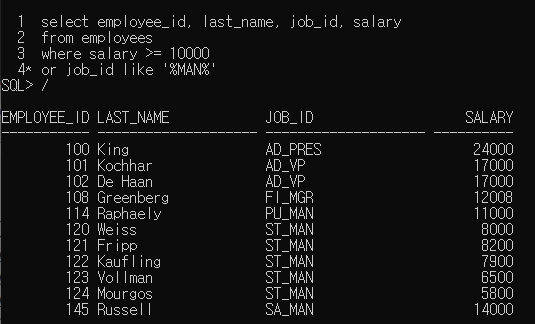
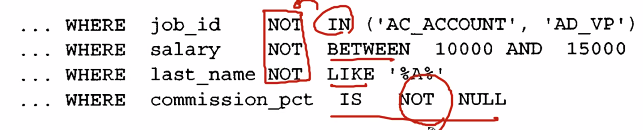
# NOT 연산자
select last_name, job_id
from employees
where job_id
not in ('IT_PROG', 'ST_CLERK', 'SA_REP');
IN, BETWEEN, LIKE는 NOT이 앞에 왔지만 NULL의 경우 가운데에 삽입됨
select last_name, job_id, salary
from employees
where job_id = 'SA_REP'
or job_id = 'AD_PRES'
and salary > 15000;

// and가 먼저 실행
// job_id = 'AD_PRES' 와 salary > 15000인 사람 또는 job_id = 'SA_REP' 인 사람
// or을 먼저 실행하고 싶으면 ()로 묶어서 실행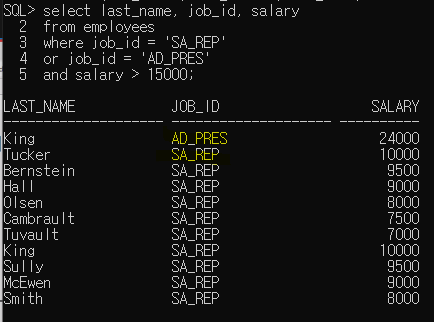
# ORDER BY절
- 행을 정렬 함
- ASC : 오름차순, 기본값 => 생략 가능
- DESC : 내림차순
select last_name, job_id, department_id, hire_date
from employees
order by hire_date;
| ※ 실행 순서 : from -> where -> select -> order by(alias에서 사용된 명칭 사용 가능) ※ |
select employee_id, last_name, salary*12 annsal
from employees
order by annsal;


// select 절에서 "annsal"으로 적은 경우
// order by절에서도 "annsal"로 적어야함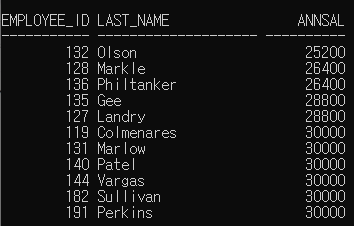
select employee_id, last_name, salary*12
from employees
order by 3

// 사용하지 말 것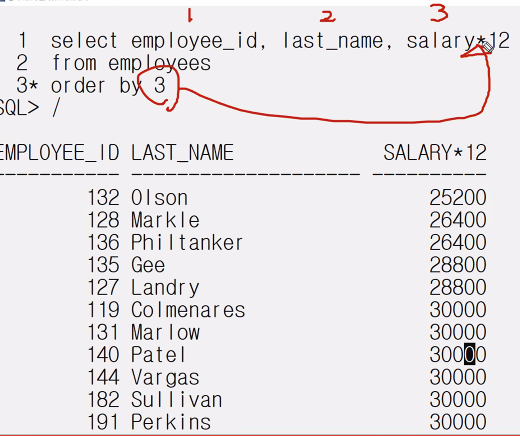
select last_name, department_id, salary
from employees
order by department_id, salary desc;

// 부서 먼저 오름차순으로 정렬이 되고
// 급여의 경우 부서 내에서 정렬이 수행이 됨
// ex) 부서 번호가 30인 사람들 내에서 내림차순으로 정렬
# 연습 문제
1. 문제 연봉이120000 이상되는 사원들의 이름 및 연봉을 출력
select last_name, salary*12
from employees
where salary*12 >= 120000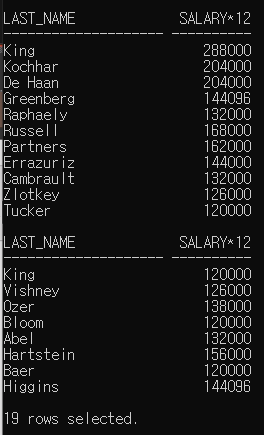
2. 사원번호가 176인 사원의 이름과 부서 번호를 출력하시오.
select last_name, department_id
from employees
where employee_id = 176;
3. 연봉이 150,000에서 200,000의 범위 이외인 사람들의 이름 및 연봉을 출력하시오. 단 연봉은 AnnSal로 출력하시오.
select last_name, salary*12 "AnnSal"
from employees
where salary*12 not between 150000 and 200000;
4. 2003/01/01 일부터 2005/05/30일 사이에 고용된 사원들의 이름, 사번, 고용일자를 출력하시오.
단, 고용일자를 역순으로 정렬하시오.
select last_name, employee_id, hire_date
from employees
where hire_date between '03/01/01' and 05/05/30'
order by hire_date desc;

// like 형식에서는 2003/01/01로 하면 좋지 않음.
// between에서는 년/월/일 형태가 되면 출력이 됨.
5. 20번 및 50번 부서에서 근무하는 모든 사원들의 이름 및 부서 번호를 알파벳순으로 출력하시오.
select last_name, department_id
from employees
where department_id in (20, 50)
order by last_name;

// ASC : 오름차순(생략 가능)
6. 20번 및 50번 부서에 근무하며, 연봉이 200000 ~ 250000 사이인 사원들의 이름 및 연봉을 출력하시오.
select last_name, salary*12
from employees
where department_id in (20, 50)
and salary*12 between 200000 and 250000;
7번 문제 생략
8. 매니저가 없는 사람들의 이름 및 업무를 출력하시오.
select last_name, job_id
from employees
where manager_id is null;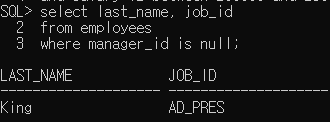
9. 매니저가 있는 사람들의 이름 및 업무, 매니저 번호를 조회한다.
select last_name, job_id, manager_id
from employees
where manager_id is not null;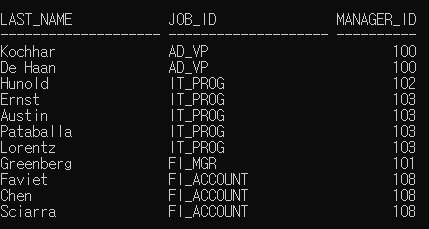
10. 커미션을 받는 모든 사원들의 이름, 연봉 및 커미션을 출력하시오.
- 연봉을 역순으로 정렬하고, 연봉은 ANNSAL로 출력하시오.
select last_name, salary*12 as annsal, commission_pct
from employees
where commission_pct is not null
order by annsal desc;
11. 이름의 네번째 글자가 a인 사원의 이름을 조회하시오.
select last_name
from employees
where last_name like '___a%';

//'___a' 로만 검색할 경우 a로 끝나는 4글자 이름만 출력하게 됨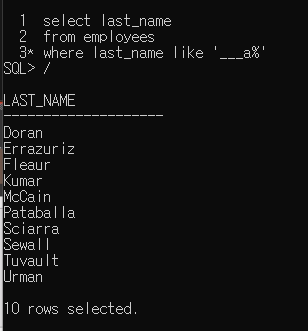
12. 이름에 a 및 e 글자가 있는 사원의 이름을 조회 하시오.
select last_name
from employees
where last_name like '%a%'
and last_name like '%e%';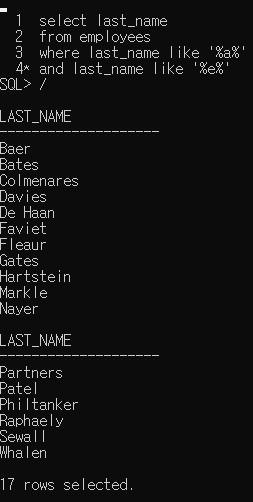
13. 급여가 2500, 3500, 7000이 아니며 직업이 SA_REP 나 ST_CLERK인 사원의 이름과, 급여, 직업을 출력하시오.
select last_name, salary, job_id
from employees
where salary not in (2500, 3500, 7000)
and job_id in ('SA_REP', 'ST_CLERK');
14. 30번 부서내의 모든 직업들을 유일한 값으로 출력하시오. 90번 부서 또한 포함하고, 직업을 오름차순으로 출력하시오.
select distinct job_id, department_id
from employees
where department_id in (30, 90)
order by job_id;
오후 [JAVA]
# 산술 연산자 예제

import java.util.Scanner;

public class Ex01_연산자실습1 {

	public static void main(String[] args) {
		// 두 개의 정수를 입력받기! -> Scanner

		// 더하기, 빼기, 곱하기, 나누기(몫) 출력

		Scanner sc = new Scanner(System.in);

		System.out.print("첫 번째 정수 입력 : ");
		int a = sc.nextInt();

		System.out.print("두 번째 정수 입력 : ");
		int b = sc.nextInt();

		System.out.println("두 수의 더하기 : " + (a + b));
		System.out.println("두 수의 빼기 : " +(a - b) );
		System.out.println("두 수의 곱하기 : " + a * b);
		System.out.println("두 수의 나누기(몫) : " + a / b);

	}

}
# 논리 연산자 : NOT, AND, OR
| !(NOT) | ! (피연산자) |
| &&(AND), ||(OR) | (피연산자1) && (피연산자2), (피연산자1) || (피연산자2) , |
public class Ex02_연산자실습2 {

	public static void main(String[] args) {
		int a = 3;
		int b = 10;

        	System.out.println(a>b);
		System.out.println(!(a>b));
	}

}
// False
// True
# AND연산자 (&&)
- 곱하기 연산자
- 하나라도 거짓이면 False
| 참 명제 && 참 명제 : True |
| 참 명제 && 거짓 명제 : False |
| 거짓 명제 && 거짓 명제 : False |
| 거짓 명제 && 거짓 명제 : False |
# OR 연산자 (||)
- 더하기 연산자
- 하나라도 참이면 True
| 참 명제 || 참 망제 |
| 참 명제 || 거짓 명제 |
| 거짓 명제 || 참 명제 |
| 거짓 명제 || 거짓 명제 |
public class Ex03_연산자실습3 {

	public static void main(String[] args) {
		// TODO Auto-generated method stub
		System.out.println((1<3) && (4<5));
		System.out.println((2<1) && (4<5));
		System.out.println((1<3) || (4<2));
		System.out.println((2<1) || (4<2));

	}

}
# 삼항 연산자 : 간단한 제어 처리
?(삼항 연산자) :(조건 연산자)
| ? : (삼항 연산자, 조건 연산자) |
(조건문) ? (실행문1) : (실행문2) |
# 실습4

import java.util.Scanner;

public class Ex04_연산자실습4 {

	public static void main(String[] args) {
		// num1, num2 에 두 정수를 입력받기 -> Scanner
		// num1이 num2 보다 크면 true 값 출력
		// num1이 num2 보다 작거나 같으면 false 값 출력

		// 삼항 연산자
		// 조건식 ? 참일 때 실행문 : 거짓일때 실행문
		Scanner sc = new Scanner(System.in);

		System.out.print("num1 : ");
		int num1 = sc.nextInt();

		System.out.print("num2 : ");
		int num2 = sc.nextInt();

		System.out.println(num1>num2?true:false);


	}

}
# 실습5

import java.util.Scanner;

public class Ex05_연산자실습5 {

	public static void main(String[] args) {
		// TODO Auto-generated method stub
		// 정수를 입력받아서(num)
		// Scanner 도구 사용
		// 홀수인지 짝수인지 판별하기

        // 정수 입력받기
		Scanner sc = new Scanner(System.in);
		System.out.print("정수를 입력하세요 : ");
		int num = sc.nextInt();

        // 홀수인지 짝수인지 출력하기
		System.out.println((num%2==0)?"짝수":"홀수");
	}

}
# 실습6
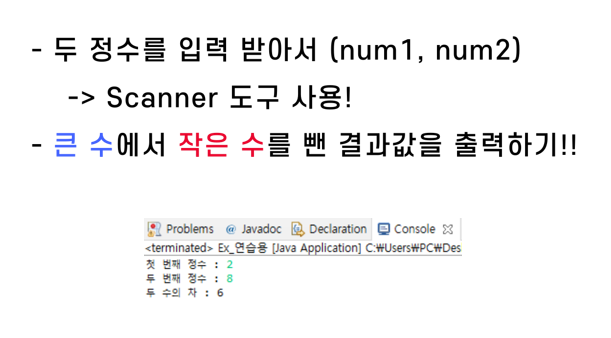
import java.util.Scanner;

public class Ex06_연산자실습6 {

	public static void main(String[] args) {
		// TODO Auto-generated method stub
		// 두 정수를 입력 받아서(num1, num2)
		// Scanner 도구 사용
		// 큰 수에서 작은 수를 뺀 결과 값을 출력하기

		Scanner sc = new Scanner(System.in);
		System.out.print("첫 번째 정수 : ");
		int num1 = sc.nextInt();

		System.out.print("두 번째 정수 : ");
		int num2 = sc.nextInt();

		int result = num1>num2?num1-num2:num2-num1;

		System.out.println("두 수의 차 : " + result);
	}

}
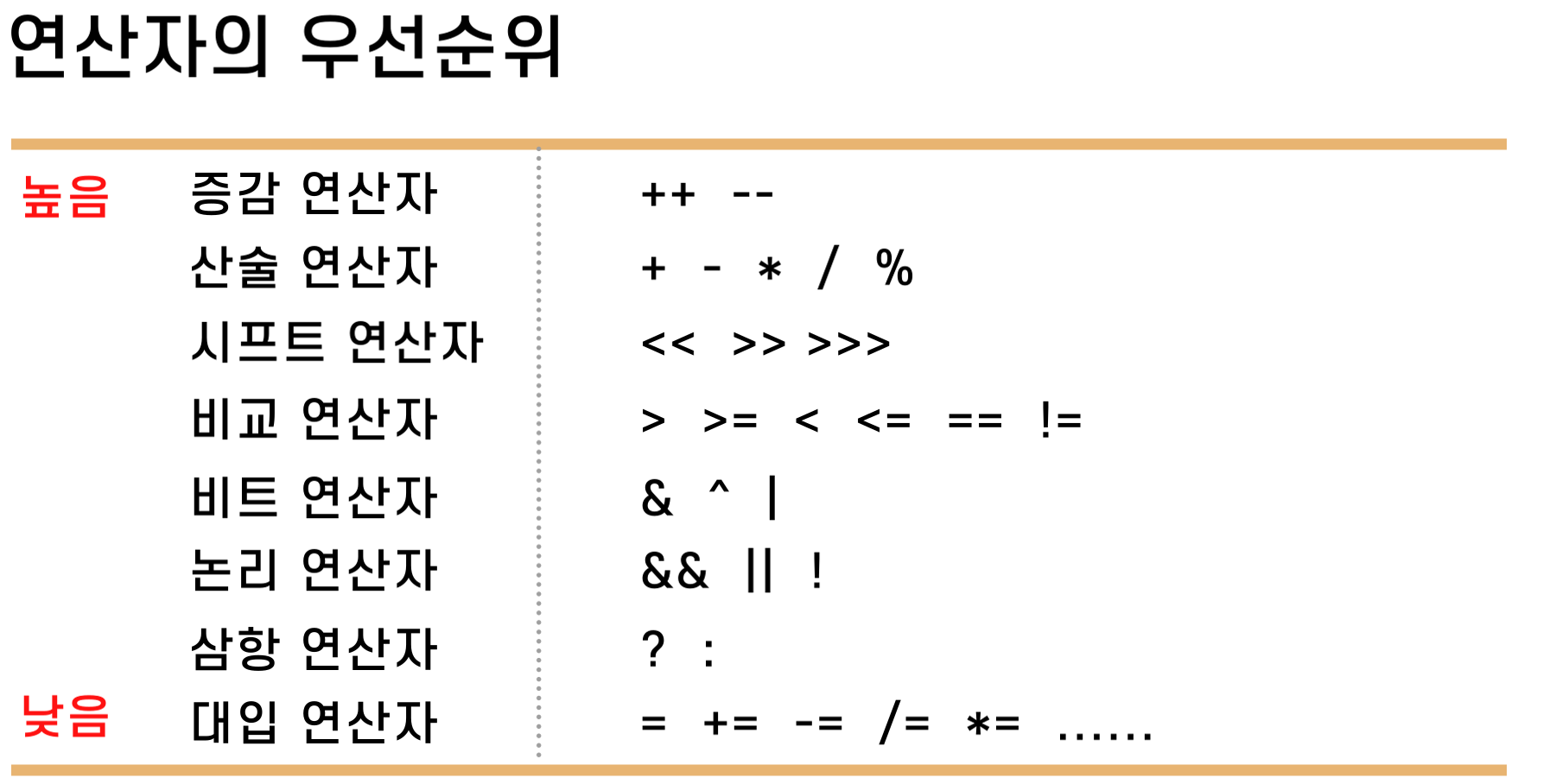
# 연산자 우선순위
조건문(Coditional Statement)
| 단순 if문 | if-else문 |
| 다중 if문 | switch문 |
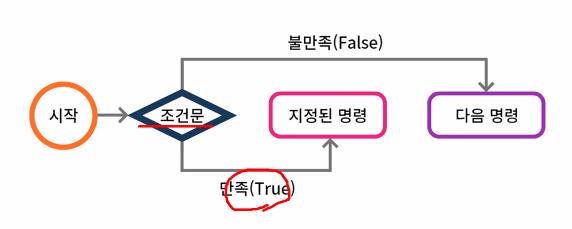
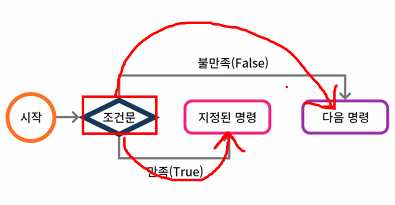
주어진 조건을 비교 판단하여 그 조건에
만족할 경우 지정된 명령 실행
불만족 할 경우 다음 명령을 실행
▶단순 if문
< 흐름도 >

< 문법 >

예제1

package 조건문;

import java.util.Scanner;

public class Ex01_단순if문1 {

	public static void main(String[] args) {
		// TODO Auto-generated method stub
		Scanner sc = new Scanner(System.in);
		System.out.print("값을 입력하세요 : ");
		int num = sc.nextInt();

		if(num>10) {
			System.out.println("10보다 큽니다.");
		}

		System.out.println("프로그램 종료!");
	}

}
예제2
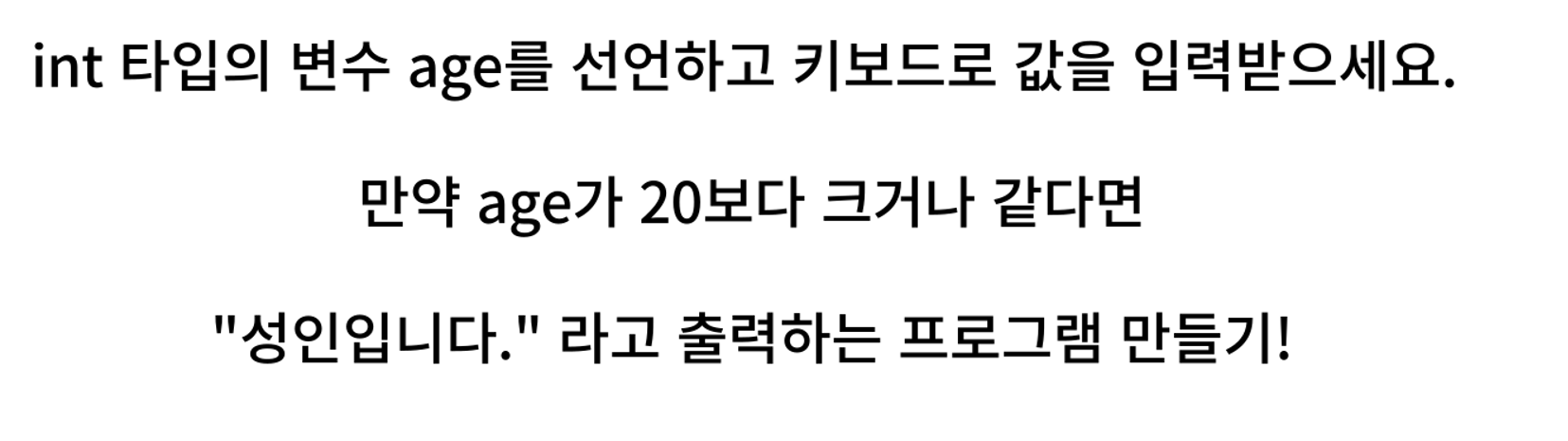
package 조건문;

import java.util.Scanner;

public class Ex02_단순if2 {

	public static void main(String[] args) {
		// TODO Auto-generated method stub

		Scanner sc = new Scanner(System.in);
		System.out.print("나이를 입력하세요 : ");

		int age = sc.nextInt();

		if(age >= 20) {
			System.out.println("성인 입니다!");
		}

	}

}▶if - else문
<흐름도>
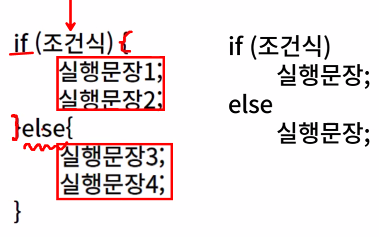
<문법>
예제

package 조건문;

import java.util.Scanner;

public class Ex03_if_else문1 {

	public static void main(String[] args) {
		// TODO Auto-generated method stub
		Scanner sc = new Scanner(System.in);

		System.out.print("입력한 정수 : ");
		int num = sc.nextInt();

		if (num%2==0)
		{
			System.out.println(num + "는(은) 짝수입니다.");
		}
		else {
			 System.out.println(num + "는(은) 홀수입니다.");
		}

	}

}
예제2

package 조건문;

import java.util.Scanner;

public class Ex04_if_else문2 {

	public static void main(String[] args) {
		// TODO Auto-generated method stub
		Scanner sc = new Scanner(System.in);
		System.out.print("숫자 입력 : ");
		int num = sc.nextInt();

		if((num%10>4)) {
			System.out.println("반올림 수 : "+ (num + (10-(num%10))));
//			System.out.println("반올림 수 : "+ (num/10*10 +10);
		}
		else {
			System.out.println("반올림 수 : " + (num - (num%10)));
//			System.out.println("반올림 수 : "+ (num/10*10);
		}

	}

}▶다중 if문
<흐름도>

<문법>
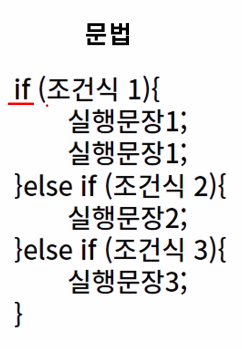
예제1

package 조건문;

import java.util.Scanner;

public class Ex05_다중if문1 {

	public static void main(String[] args) {
		// TODO Auto-generated method stub
		// grade가 90점 이상이면 "A학점"
		// grade가 80점 이상 90점 미만이면 "B학점"
		// grade가 70점 이상 80점 미만이면 "C학점"
		// 그 외에는 "재수강" 출력하기!
		Scanner sc = new Scanner(System.in);
		System.out.print("점수를 입력하세요 : ");
		int grade = sc.nextInt();

		if (grade >= 90) {
			System.out.println("A학점");
		} else if (grade >= 80) {
			System.out.println("B학점");
		} else if (grade >= 70) {
			System.out.println("C학점");
		} else {
			System.out.println("재수강");
		}

	}

}
예제2
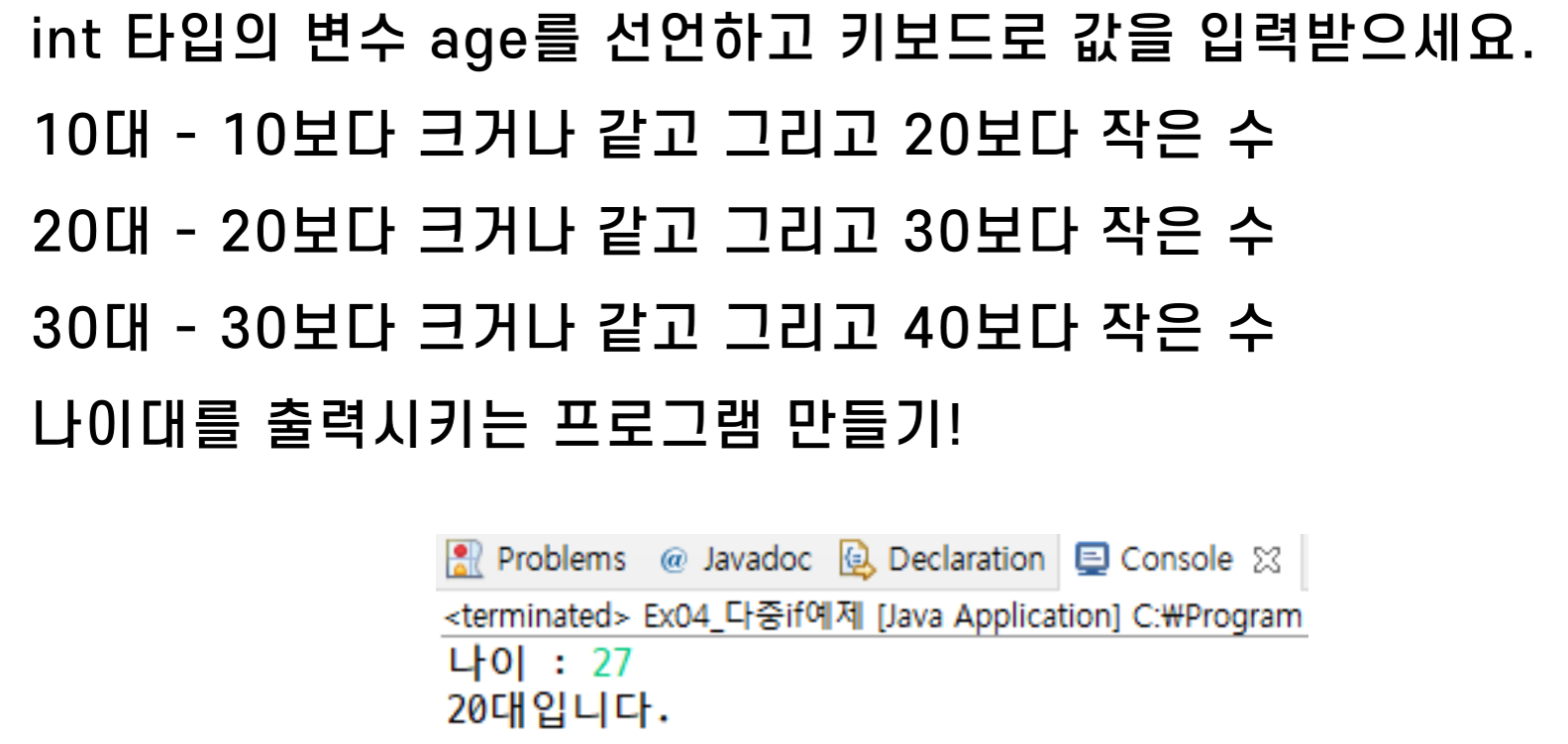
package 조건문;

import java.util.Scanner;

public class Ex06_다중if문2 {

	public static void main(String[] args) {
		// TODO Auto-generated method stub
		Scanner sc = new Scanner(System.in);
		System.out.print("나이 : ");
		int age = sc.nextInt();

		if(age >= 10 && age <20) {
			System.out.println("10대입니다.");
		}
		else if(age <30) {
			System.out.println("20대입니다.");
		}
		else if(age <40) {
			System.out.println("30대입니다.");
		}
	}

}
▶switch문
<흐름도>
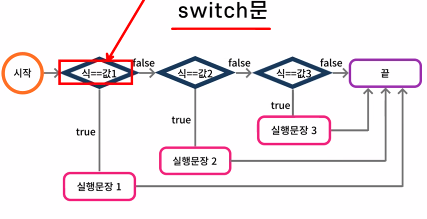
<문법>
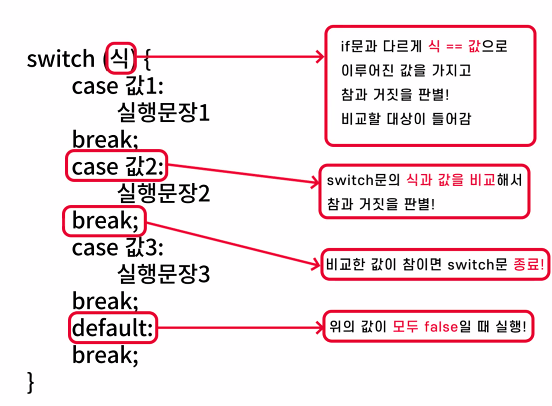
예제1
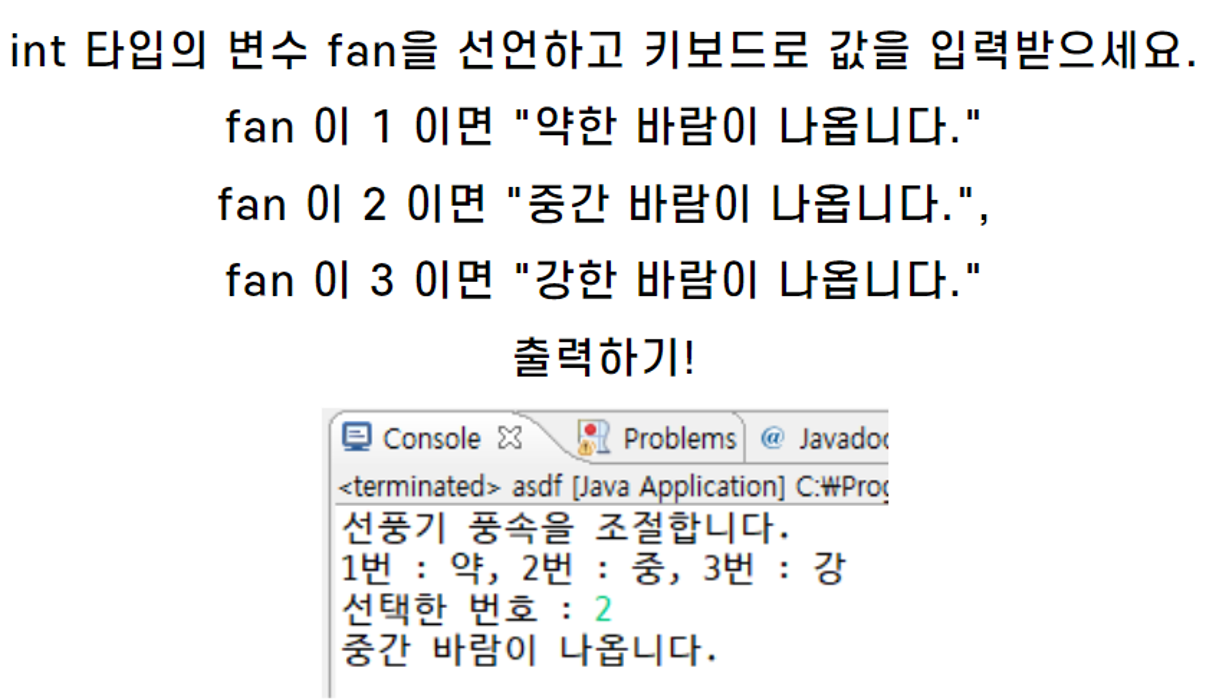
package 조건문;

import java.util.Scanner;

public class Ex07_switch문1 {

	public static void main(String[] args) {
		// TODO Auto-generated method stub
		Scanner sc = new Scanner(System.in);
		System.out.println("선풍기 풍속을 조절합니다.");
		System.out.println("1번 : 약, 2번 : 중, 3번 :강");
		System.out.print("선택한 번호 : ");

		int fan = sc.nextInt();

		switch(fan) {
		case 1:
			System.out.println("약한 바람이 나옵니다.");
			break;
		case 2:
			System.out.println("중간 바람이 나옵니다.");
			break;
		case 3:
			System.out.println("강한 바람이 나옵니다.");
			break;
		default:
			break;
		}


	}

}
예제2
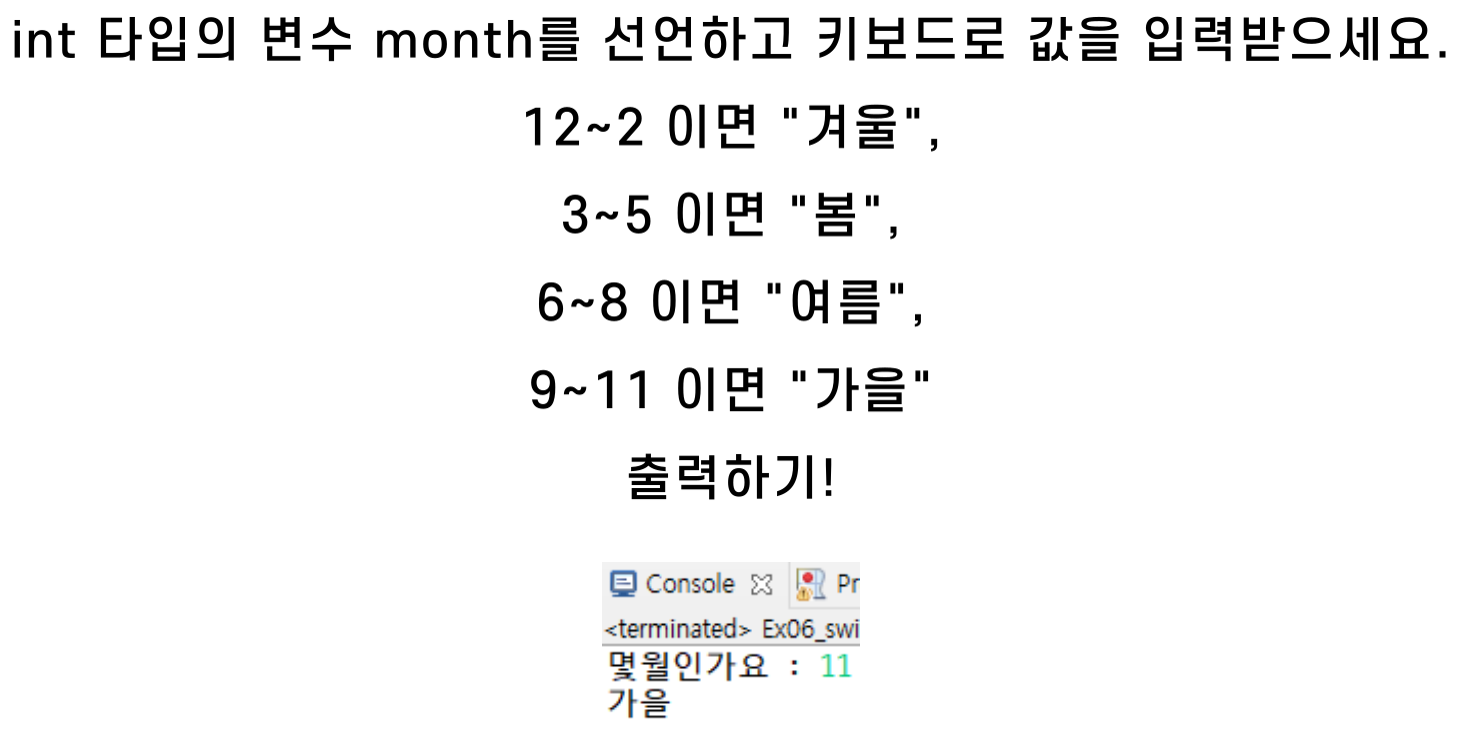
package 조건문;

import java.util.Scanner;

public class Ex08_switch문2 {

	public static void main(String[] args) {
		// TODO Auto-generated method stub
		Scanner sc = new Scanner(System.in);

		System.out.print("몇월인가요?: ");
		int month = sc.nextInt();

	      switch(month) {
	      case 12:
	      case 1:
	      case 2:
	         System.out.println("겨울");
	         break;
	      case 3:
	      case 4:
	      case 5:
	         System.out.println("봄");
	         break;
	      case 6:
	      case 7:
	      case 8:
	         System.out.println("여름");
	         break;
	      case 9:
	      case 10:
	      case 11:
	         System.out.println("가을");
	         break;
	      }

	}

}
'ESG' 카테고리의 다른 글
| [2022년 청년친화형 기업 ESG지원 사업 - 6] (0) | 2022.09.14 |
|---|---|
| [2022년 청년친화형 기업 ESG지원 사업 - 5] (0) | 2022.09.13 |
| [2022년 청년친화형 기업 ESG지원 사업 - 3] (0) | 2022.09.07 |
| [2022년 청년친화형 기업 ESG지원 사업 - 2] (0) | 2022.09.06 |
| [2022 청년친화형 기업 ESG지원 사업 - 1] (0) | 2022.09.05 |


