
ALLYES
[2022년 청년친화형 기업 ESG지원 사업 - 5] 본문
일시 : 2022.09.13
시간 : 9:00 ~ 18:00
오전 : Java
오후 : Database
오전 [Java]
switch 예제 : 가위바위보 게임
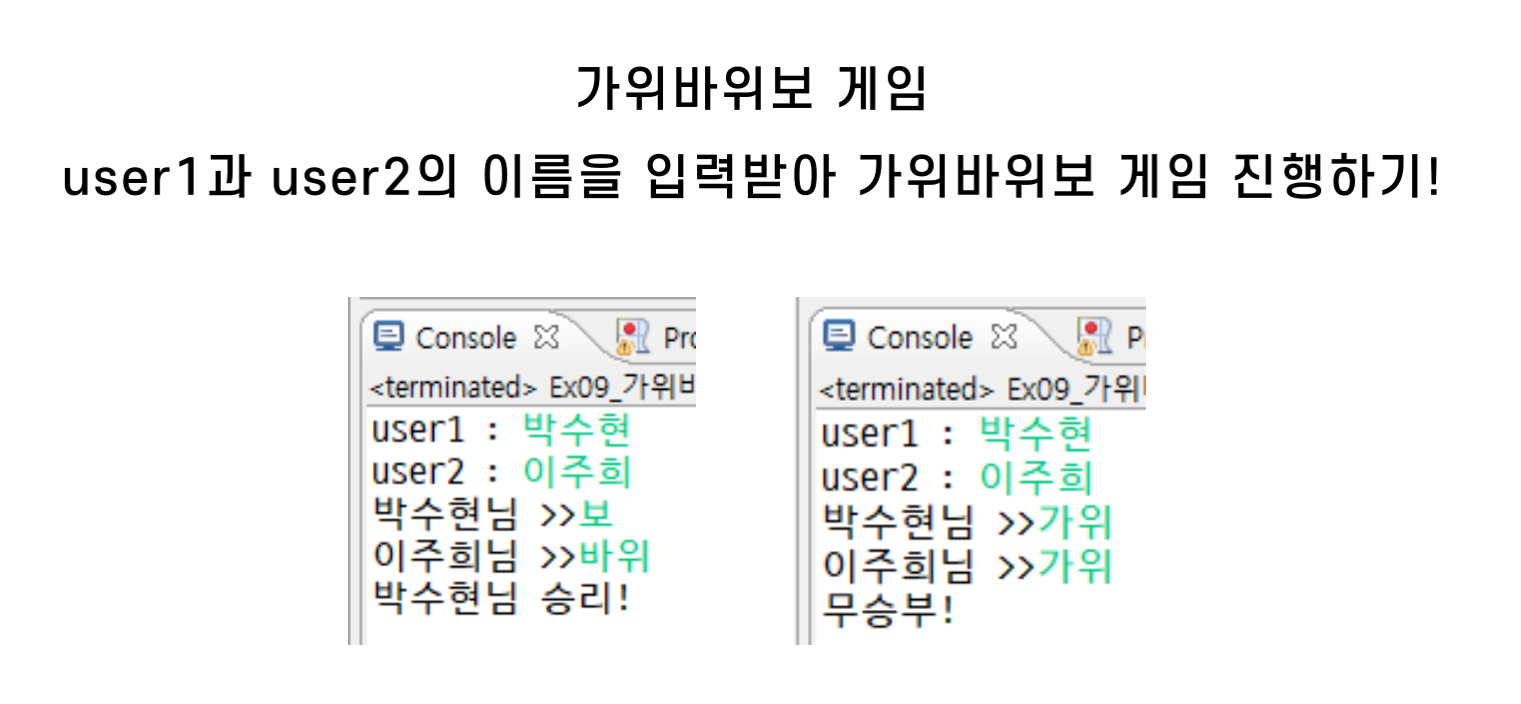
# 가위바위보 : switch문
package 조건문;

import java.util.Scanner;

public class Ex09_switch문3 {

	public static void main(String[] args) {
		// 가위바위보 프로그램 만들기

		Scanner sc = new Scanner(System.in);

		// user1과 user2를 입력받기
		System.out.print("user1 : ");
		String user1 = sc.next();

		System.out.print("user2 : ");
		String user2 = sc.next();

		// user1과 user2가 낸 가위바위보 입력 받기
		System.out.print(user1 +"님 >> ");
		String user1_str = sc.next();

		System.out.print(user2 +"님 >> ");
		String user2_str = sc.next();

		// user1과 user2가 낸 가위 바위 보를 순서대로 받기
		// user1 : 가위, user2 : 바위 -> String str = "가위바위";


		String str = user1_str + user2_str;

		switch(str) {
		case "보보":
		case "가위가위":
		case "바위바위":
			System.out.println("무승부!");
			break;
		case "가위바위":
		case "바위보":
		case "보가위":
			System.out.println(user2 + "님의 승리");
			break;
		case "가위보":
		case "바위가위":
		case "보바위":
			System.out.println(user1 + "님의 승리");
			break;
		default:
			System.out.println("잘못 입력하셨습니다.");
			break;
		}


	}

}
# 가위바위보 : 다중 if문
- 값.equals(비교 값)
package 조건문;

import java.util.Scanner;

public class Ex10_switch_다중if {

	public static void main(String[] args) {
		// 가위바위보 프로그램 만들기

		Scanner sc = new Scanner(System.in);

		// user1과 user2를 입력받기
		System.out.print("user1 : ");
		String user1 = sc.next();

		System.out.print("user2 : ");
		String user2 = sc.next();

		// user1과 user2가 낸 가위바위보 입력 받기
		System.out.print(user1 +"님 >> ");
		String user1_str = sc.next();

		System.out.print(user2 +"님 >> ");
		String user2_str = sc.next();

		// user1과 user2가 낸 가위 바위 보를 순서대로 받기
		// user1 : 가위, user2 : 바위 -> String str = "가위바위";

		String str = user1_str + user2_str;

		// 문자열과 문자열을 비교해주는 함수 -> 값.equals(비교할 값)

		if(str.equals("바위바위")|| str.equals("가위가위")|| str.equals("보보")) {
			System.out.println("무승부");
		}
		else if(str.equals("보바위")||str.equals("바위가위") || str.equals("가위보")) {
			System.out.println(user1 + "님의 승리");
		}
		else if(str.equals("바위보")||str.equals("가위바위") || str.equals("보가위")) {
			System.out.println(user2 + "님의 승리");
		}
		else {
			System.out.println("잘못 입력하셨습니다.");
		}


	}

}
# 가위바위보 : else if문
package 조건문;

import java.util.Scanner;

public class Ex11_switch_if2 {

	public static void main(String[] args) {
		// TODO Auto-generated method stub
		Scanner sc = new Scanner(System.in);

		System.out.print("user1 : ");
		String user1 = sc.next();

		System.out.print("user2 : ");
		String user2 = sc.next();

		// user1과 user2가 낸 가위바위보 입력 받기
		System.out.print(user1 +"님 >> ");
		String user1_str = sc.next();

		System.out.print(user2 +"님 >> ");
		String user2_str = sc.next();


		if(user1_str.equals(user2_str)) {
			System.out.println("무승부");
		}
		else if(user1_str.equals("가위")) {
			if(user2_str.equals("바위")) {
				System.out.println(user2 + "님의 승리");
			}
			else{
				System.out.println(user1 + "님의 승리");
			}
		}
		else if(user1_str.equals("바위")) {
			if(user2_str.equals("가위")) {
				System.out.println(user1 + "님의 승리");
			}
			else {
				System.out.println(user2 + "님의 승리");
			}
		}
		else if(user1_str.equals("보")) {
			if(user2_str.equals("가위")) {
				System.out.println(user2 + "님의 승리");
			}
			else {
				System.out.println(user1 + "님의 승리");
			}
		}
		else {
			System.out.println("잘못 입력하셨습니다.");
		}
	}

}
● 반복문
- 같은 내용이나 동작을 반복하여 출력, 실행하는 구조
- 특정한 명령을 간소화 하기 위해 반복문 사용

- while 문
- 반복 횟수가 정해지지 않은 경우
< 흐름도 >
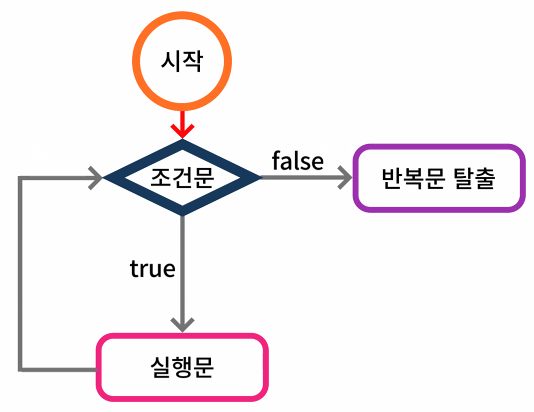
< 코드 >

while문 예제1
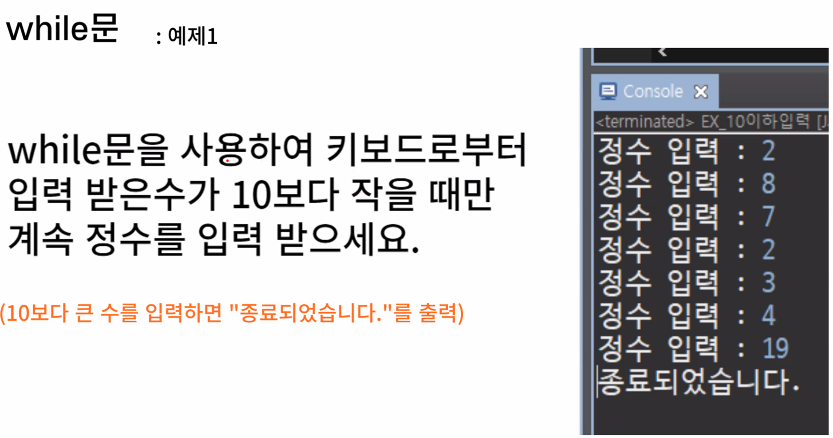
import java.util.Scanner;

public class Ex01_while문1 {

	public static void main(String[] args) {
		// 정수 입력 받기
		Scanner sc = new Scanner(System.in);

		int num = 0;

		// 정수 입력 받기
		while(num < 10) {
			// 반복되는 실행문
			System.out.print("정수 입력 : ");
			num = sc.nextInt();
		}
		System.out.println("종료되었습니다.");

//		while(true) {
//			System.out.println("정수 입력 : ");
//			int num = sc.nextInt();
//
//			if(num > 10) {
//				System.out.println("종료되었습니다.");
//				break;
//			}
//		}
	}


}
while문 예제2
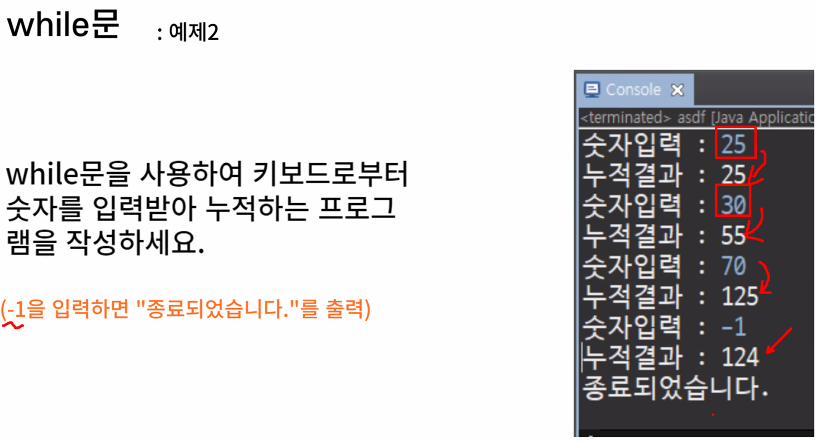
import java.util.Scanner;

public class Ex02_while문2 {

	public static void main(String[] args) {
		// TODO Auto-generated method stub
		Scanner sc = new Scanner(System.in);
		int num = 0;
		int sum = 0;

		while(true) {
			System.out.print("숫자 입력 : ");

			num = sc.nextInt();
			sum += num;

			System.out.println("누적결과 : " + sum);

			if(num == -1) {
				System.out.println("종료되었습니다.");
				break;
			}
		}
	}

}
while문 예제3
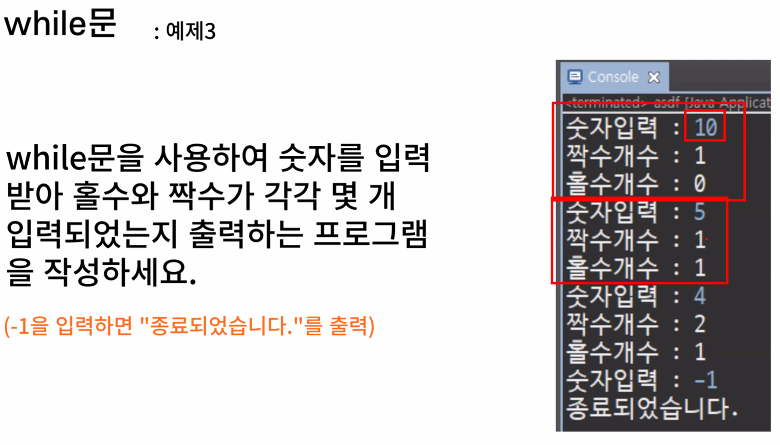
import java.util.Scanner;

public class Ex03_while문3 {

	public static void main(String[] args) {
		// 스캐너 선언
		Scanner sc = new Scanner(System.in);

		int num = 0;
		int even = 0;
		int odd = 0;

		while(true) {
			//숫자 입력 받기
			System.out.print("숫자 입력 : ");
			num = sc.nextInt();

			// num == -1 인 경우
			if(num == -1) {
				System.out.println("종료되었습니다");
				break;
			}
			// num이 홀수인 경우
			else if(num%2==1){
				odd++;
				System.out.println("짝수 개수 : " + even);
				System.out.println("홀수 개수 : " + odd);
			}
			// num이 짝수인 경우
			else {
				even++;
				System.out.println("짝수 개수 : " + even);
				System.out.println("홀수 개수 : " + odd);
			}
		}
	}

}- do-while문

do-while문 예제1
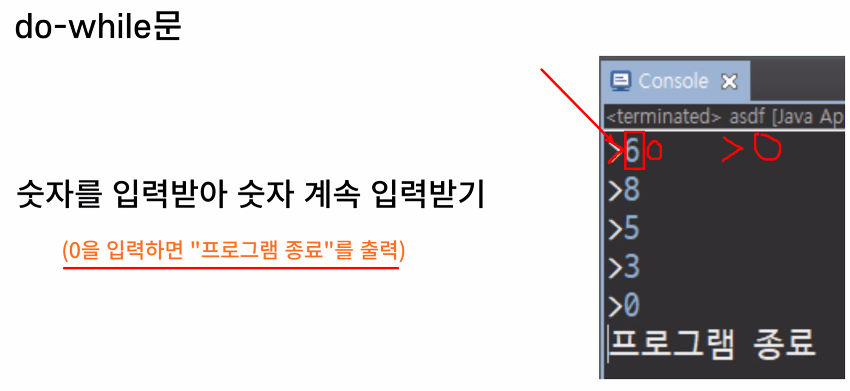
import java.util.Scanner;

public class Ex04_dowhile1 {

	public static void main(String[] args) {
		// TODO Auto-generated method stub
//		int num = 5;
//
//		do {
//			// 무조건 한번은 실행이 되는 문장
//			// 만약에 조건식이 false라면 한번 실행되고 종료
//			// 만약에 조건식이 true 라면 계속 실행
//			System.out.println(num + " - Do While!");
//		}while(num < 9);
		Scanner sc = new Scanner(System.in);

		int num;

		do {
			// 0을 누를때까지 계속 숫자 입력 가능
			System.out.print(">");
			num = sc.nextInt();
		}while(num != 0);

		System.out.println("프로그램 종료");
	}

}
do-while문 예제2
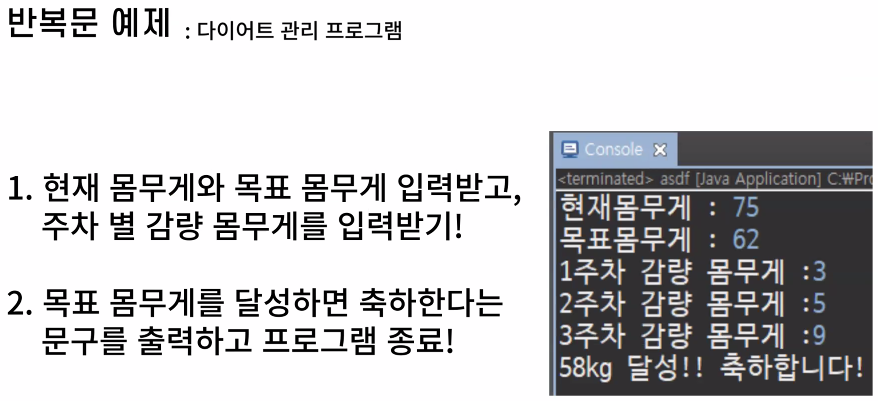
import java.util.Scanner;

public class Ex05_dowhile2 {

	public static void main(String[] args) {
		// TODO Auto-generated method stub
		Scanner sc = new Scanner(System.in);

		int pw;	// 현재 몸무게
		int goal; // 목표 몸무게

		System.out.print("현재 몸무게 : ");
		pw = sc.nextInt();
		System.out.print("목표 몸무게 : ");
		goal = sc.nextInt();
		int n = 0; // 주차
		int weight = 0; // 감량 몸무게

		do {
			n++;
			System.out.println(n + "주차 감량 몸무게 : " + weight);
			weight = sc.nextInt();
			goal = pw - weight;

		}while(pw != goal);
		System.out.println( goal + " 달성 축하드립니다.");
	}

}
오후 [Database]
select distinct * column alias
from
where
order by

문제 : 근무하는 사원의 이름과 그 사원이 근무하는 부서이름을 출력하시오.
select last_name, department_name
from employees, departments;
JOIN : 여러개의 테이블에서 데이터를 검색
- 시스템 내부에서는 조인대상 테이블의 행을 하나로 조합 진행
- 행을 조합할 때 반드시 무결성이 보장이 되도록 행의 조합이 필요
- 조건을 줘서 조건에 맞는 행의 조합을 통해 무결성을 보장
- 조건 : 조인조건, where 절에 반드시 조인 조건을 n-1개 만큼 작성해야함
- n : 조인대상 table의 개수
- 똑같은 이름을 가진 column을 명시 할 때는 소유중인 table의 이름을 명시
- 조인조건이 생략이 되거나 잘못 작성이 되었을시 카티션프로덕트 현상이 발생
- 2889 : 107 x 27
- 107 : 사원의 수
- 27 : 부서의 개수
select last_name, department_name
from employees, departments
where employees.department_id = departments.department_id;
조인의 유형
- 오라클 전용 조인
- 2개 이상의 table
- 등가 조인 : 같은 data 존재(equi)
- 비등가 조인 : data가 다른 때(non-equi)
- 포괄 조인 : 어느 한쪽 table에 data가 많을 때(outer)
- 1개의 table
- 자체 조인
- 2개 이상의 table
select last_name, department_name, employees.department_id
from employees, departments
where employees.department_id = departments.department_id;- 조건
- where 절에 반드시 조인 조건을 n-1개 만큼 작성해야함
- 똑같은 이름을 가진 column을 명시 할 때는 소유중인 table의 이름을 접두어로 명시
- table의 full name 작성
- from절에 alias 를 사용하여 이름 간소화
- 위 작성법들은 혼용해서 사용 불가능
select e.last_name, d.department_name, e.department_id
from employees e, departments d
where e.department_id = d.department_id;
등가 조인
- 같은 데이터가 존재 했을 때 사용
- = 연산자 사용
조인 테이블의 구조를 확인 할 것
똑같은 이름의 테이블이 있으면 fk, pk인지 확인
컬럼 이름 똑같은 거 확인
데이터 확인
문제 : 회사에 근무하는 사원의 이름과 부서번호와 부서이름과 지역번호 출력
select e.last_name, e.department_id, d.department_name, d.location_id
from employees e, departments d
where e.department_id = d.department_id;
문제 : 연봉이 100000이상인 사원의 이름과 부서이름을 출력하시오.
select e.last_name, e.salary*12, d.department_name
from employees e, departments d
where e.department_id = d.department_id
and e.salary*12 >= 100000;
SQL 연습문제
15. 모든 사원들의 이름, 부서 이름 및 부서 번호를 출력하시오.
select e.last_name, d.department_name, d.department_id
from employees e, departments d
where e.department_id = d.department_id;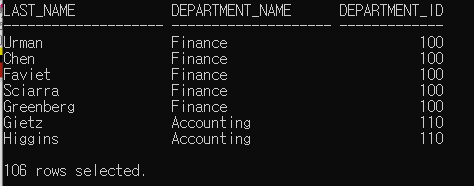
16. 급여가 15000 이상인 사원의 이름과 급여, 그 사원이 근무하는 부서 이름을 출력하시오.
select e.last_name, e.salary, d.department_name
from employees e, departments d
where e.department_id = d.department_id
and e.salary >= 15000;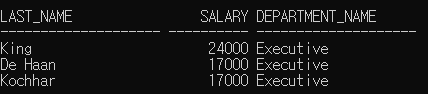
17. 연봉이 150000 이상인 사원의 이름과 연봉, 그 사원이 근무하는 부서이름과 부서가 위치한 지역번호를 출력하시오. 단 연봉은 AnnSal로 출력하시오.
select e.last_name, e.salary*12 "AnnSal", d.department_name, d.location_id
from employees e, departments d
where e.department_id = d.department_id
and e.salary*12 >= 150000;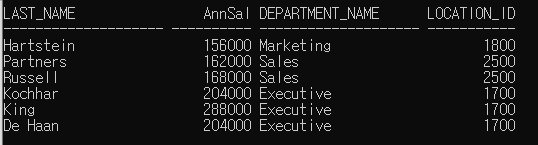
데이터가 다를 때 조인조건
select e.last_name, e.salary, j.grade
from employees e, salgrade j
where e.salary between j.losal and j.hisal;
18. 회사에 근무하는 사원중 급여 등급이 5이하인 사원의 이름과 급여와 사원별 급여등급을 내림차순으로 정렬하여 출력하시오.
select e.last_name, e.salary, j.grade
from employees e, salgrade j
where e.salary between j.losal and j.hisal
and j.grade <= 5
order by j.grade desc;
outer 조인 '(+)'
select e.employee_id, e.department_id, d.department_id
from employees e, departments d
where e.department_id = d.department_id(+)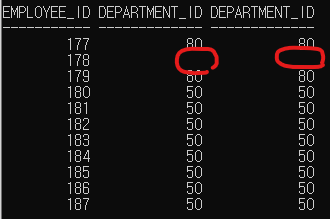
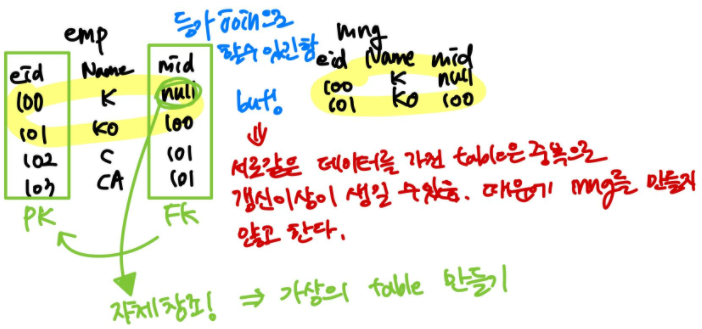
사원의 번호와 이름, 관리하는 관리자 번호와 관리자 이름을 출력하시오.
self join (가상의 테이블처럼 사용가능)
select e.employee_id, e.last_name, e.manager_id, m.last_name
from employees e, employees m
where e.manager_id = m.employee_id;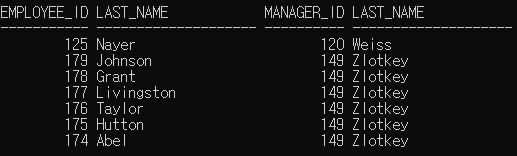
- 함수
- 하나 또는 다수의 값을 받아 하나의 값을 돌려줌
- 그룹 함수
- 행 집합에 작용하여 그룹 당 하나의 결과를 생성
- 종류
| AVG : 평균 |
| COUNT : 출력이 된 행의 수 |
| MAX : 최대 |
| MIN : 최소 |
| STDDEV |
| SUM : 합 |
| VARIANCE |
avg, sum : 숫자 데이터만 가능, 문자/날짜는 불가능
select avg(salary), sum(salary)
from employees;
select min(hire_date), max(hire_date)
from employees;select min(last_name), max(last_name)
from employees;select count(*)
from employees
where department_id = 50;select count(commission_pct)
from employees
where department_id = 80;
'ESG' 카테고리의 다른 글
| [2022년 청년친화형 기업 ESG지원 사업 - 7] (0) | 2022.09.15 |
|---|---|
| [2022년 청년친화형 기업 ESG지원 사업 - 6] (0) | 2022.09.14 |
| [2022년 청년친화형 기업 ESG지원 사업 - 4] (0) | 2022.09.08 |
| [2022년 청년친화형 기업 ESG지원 사업 - 3] (0) | 2022.09.07 |
| [2022년 청년친화형 기업 ESG지원 사업 - 2] (0) | 2022.09.06 |


