
ALLYES
[2022년 청년친화형 기업 ESG지원 사업 - 9] 본문
일시 : 2022.09.17
시간 : 9:00 ~ 18:00
오전 : Database
오후 : Java
35. 이름에 t를 포함하고 있는 사원과 같은 부서에 근무하는 사원의 이름과 사원번호와 부서번호를 출력하시오.
select last_name, employee_id, department_id
from employees
where department_id in (select department_id
				from employees
				where last_name like '%t%');
36. 최저급여를 받는 사원보다 더 많은 급여를 받는 사원의 이름과 급여를 출력하시오.
select last_name, salary
from employees
where salary > (select min(salary)
			from employees);
37. 50번 부서의 평균 급여보다 더 많은 급여를 받는 사원의 이름과 급여와 부서번호를 출력하시오.
select last_name, salary, department_id
from employees
where salary > (select avg(salary)
		from employees
		where department_id = 50);
38. 부서별 최대 급여를 받는 사원의 번호, 이름과 급여를 출력하시오.
select employee_id, last_name, salary
from employees
where salary in (select max(salary)
		from employees
		group by department_id );
in으로 인해 오류가 발생한 문제를 아래와 같이 해결
멀티플 서브 쿼리
select employee_id, last_name, salary, department_id
from employees
where (department_id,salary) in (select department_id, max(salary)
	from employees
	group by department_id );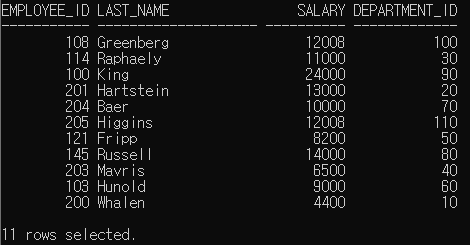
39. 50번 부서의 최저급여보다 더 많은 최저급여를 받는 부서별 최저급여를 출력하시오.
// 검색 결과 : 50번 부서의 최저 급여 : 2100
select department_id, min(salary)
from employees
group by department_id
having min(salary) > ( select min(salary)
		from employees
		where department_id = 50)
        and department_id is not null;
40. 시애틀에 근무하는 사람 중 커미션을 받지않는 모든 사람들의 이름, 부서명, 지역ID를 출력하시오.
조건
join table = emp, dept
시애틀 = seattle => locations테이블 -> city컬럼
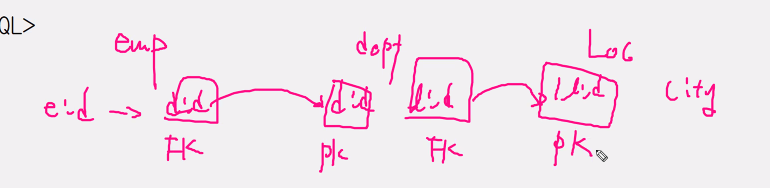
select e.last_name, d.department_name, d.location_id
from employees e, departments d
where e.department_id = d.department_id
and d.location_id = (select location_id
					from locations
                    where city = 'Seattle')
and e.commission_pct is null;
41. 이름이 DAVIES인 사람보다 후에 고용된 사원들의 이름 및 고용일자를 출력하시오. 고용일자를 역순으로 출력하시오.
Davies의 고용 날짜 : 05/01/29
select last_name, hire_date
from employees
where hire_date > (select hire_date
		from employees
		where last_name = 'Davies' )
order by hire_date desc;
IF) Davies가 2명이라면?
- > all 이면 최대값부터 큰 값을 찾기 때문에 중복된 사람 중 빨리 고용된 사람 이후의 값을 얻을 수 없음
- > any로 해야 정답
42. King을 매니저로 두고 있는 모든 사원들의 이름 및 급여를 출력하시오.
select last_name, salary
from employees
where manager_id in (select employee_id
	from employees
	where last_name = 'King');
43. 최사 전체 평균 급여보다 더 많이 받는 사원들 중 이름에 u가 있는 사원들이 근무하는 부서에서 근무하는 사원들의 사번, 이름 및 급여를 출력하시오.
서브쿼리 안에 서브쿼리 포함 가능
select employee_id,last_name,salary
from employees
where department_id in(select department_id
			from employees
			where last_name like '%u%'
			and salary>(select avg(salary)
					from employees));
DML
- db를 운영하기 위해 사용
- 데이터베이스에 무결성을 보장하기 위해 DB 운영
- DB는 현재시점을 유지해야함
- 추가 / 수정 / 삭제
- 트랜잭션
▶ 정보 처리 : 데이터를 가공하고 얻어내는 과정
- 일괄처리
- 작업들을 모아서 처리
- 단점 : 실시간으로 피드백이 되지 않음
- DB에서는 일괄처리 방식을 사용
- 실시간 온라인 처리
- 위 단점을 보완하기 위해 나온 처리 방식
- 시스템 오버헤드가 많이 발생
- 분산처리
▶ 트랜잭션
- 작업의 단위
- 일괄처리를 하기 위한 기준
- 작업 시작 ~ 작업 종료 까지의 과정
- ex) 이체 시작 >> 이체 종료 == 트랜잭션 시작 >> 트랜잭션 종료
# 트랜잭션 현상
- commit문 (저장)
- 트랜잭션이 정상적으로 수행이 되었을 때 트랜잭션이 수행한 모든 작업을 한번에 DB에 물리적으로 영구히 저장이 됨
- rollback문 (취소)
- 트랜잭션이 비정상적으로 수행이 되었을 때 트랜잭션 수행 이전 시점으로 취소
# 트랜잭션이 일어나는 시점
SQL이 실행이 되면 트랜잭션 시작
- SQL문의 종류
- select : 트랜잭션과 관련이 없음, 영향을 주지 않음
- DML : 문장 전체를 한 개의 트랜잭션으로 관리
- 연속으로 수행이된 DML명령어를 한꺼번에 수행
- 한꺼번에 수행하는 이유는 성능적인 이유가 있음
- DDL
- 명령문 하나가 1개의 트랜잭션으로 처리
- auto commit => 자동 저장
- DCL
- 명령문 하나가 1개의 트랜잭션으로 처리
- auto commit => 자동 저장
# DML 명령문
- INSERT
- 테이블에 새 행 추가
- 새 행은 맨 마지막에 추가가 됨
- 행 단위 작업
- into절에 명시된 컬럼의 순서, 개수, 타입, 길이(크기)에 맞도록 values절의 데이터를 1:1로 매칭
| insert into table_name => 모든 컬럼 values(입력할 데이터 값 명시) |
insert into table_name(column_name) => 특정 컬럼 values(입력할 데이터 값 명시) |
- DELTE
- 행단위 작업
- UPDATE
- 열단위 작업
1. insert문
insert into departments(department_id, department_name, manager_id, location_id)
values(300,'AA',100, 1700);
# null값을 넣는 방법
- into절을 이용하여 컬럼을 생략하면 자동으로 null값 삽입
- valuse 절에 null을 명시적으로 수동으로 입력
2. update문
set : 변경하고 싶은 data 지정
where을 생략하면 모든 값이 바뀜
update employees
set salary=20000
where employee_id=206;
3. delete문
where절을 생략하면 모든 행이 삭제가 됨
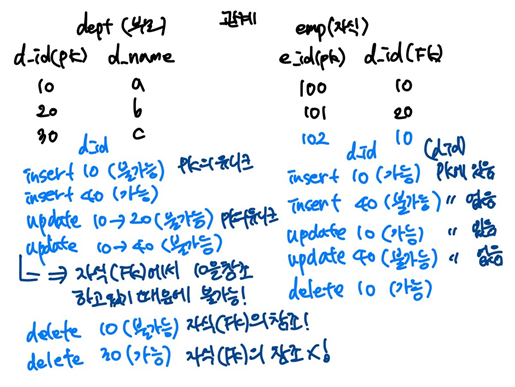
읽기일관성
- 트랜잭션이 수행이 되면 트랜잭션에 의해 변경된 데이터는 누구라도 볼 수 가 없음
- 자기 자신만 볼 수 있음
# 병행제어 기법
- 동시에 진행되는 트랜잭션들을 관리해주는 기법
- Lock
- Lock 범위
- Lock


오후 : Java
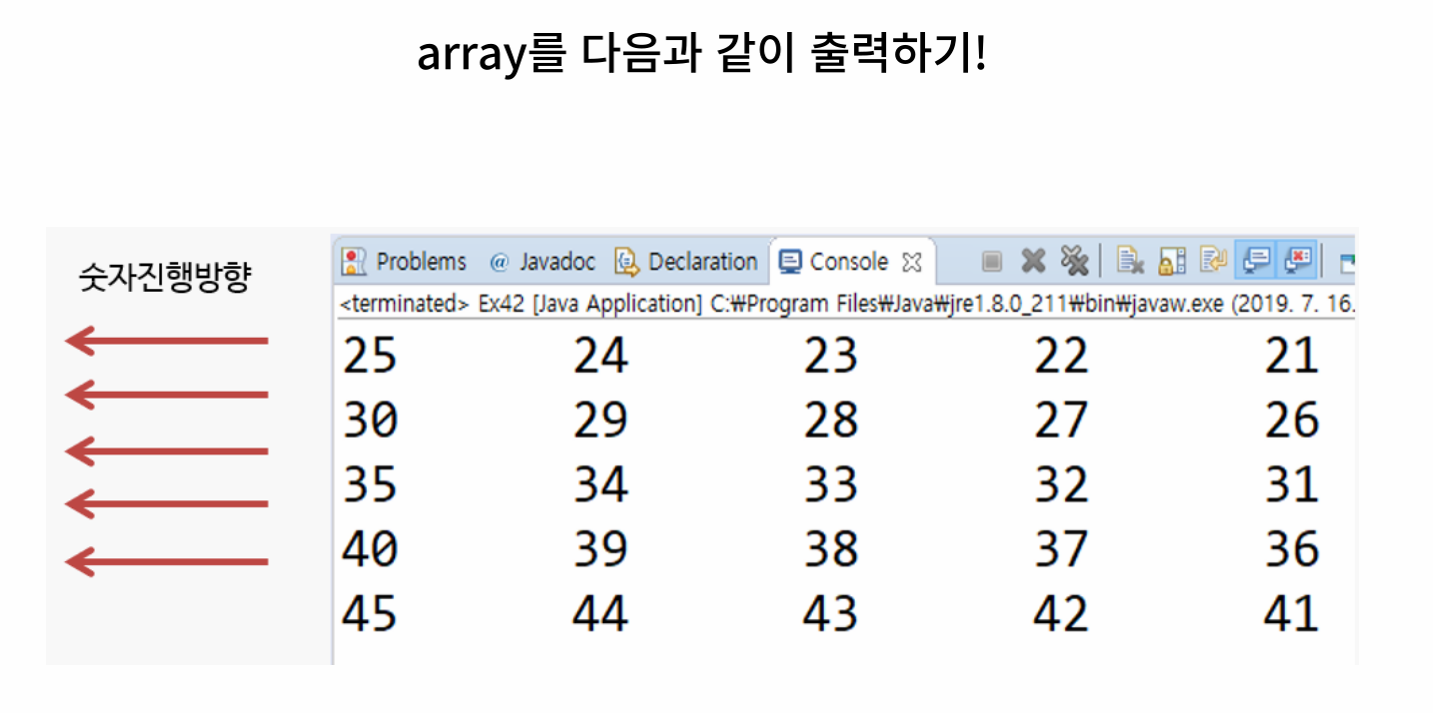
public class Ex01_이차원배열1 {

	public static void main(String[] args) {
		// TODO Auto-generated method stub

		// 1. 5행 5열의 이차원배열 선언 및 생성
		int[][] arr = new int[5][5];

		int cnt = 21;
		// 2. 21 ~ 45까지 출력
		// 행 : k
		// 열 : i

		for (int k = 0; k < arr.length; k++) {
			for (int i = 0; i < arr.length; i++) {
				arr[k][i] = cnt++;
			}

		}
		// 출력하기
		for (int k = 0; k < arr.length ; k++) {
			for (int i = 0; i <arr[k].length; i++) {
				System.out.print(arr[k][4-i] + "\t");
			}
			System.out.println();
		}
	}

}

public class Ex02_이차원배열2 {

	public static void main(String[] args) {
		// TODO Auto-generated method stub
		// 지그재그로 출력
		int[][] arr = new int[5][5];

		int cnt = 21;

		for (int i = 0; i < arr.length; i++) {
			for (int k = 0; k < arr[i].length; k++) {
				if (i % 2 == 0) {
					arr[i][k] = cnt++;
				} else {
					arr[i][4 - k] = cnt++;
				}
			}
		}

		for (int i = 0; i < arr.length; i++) {
			for (int k = 0; k < arr[i].length; k++) {
				System.out.print(arr[i][k] + "\t");
			}
			System.out.println();
		}
	}

}
이진탐색
import java.util.Scanner;

public class Ex03_이진탐색 {

	public static void main(String[] args) {
		// TODO Auto-generated method stub
		// 이진탐색(Binary Search)
		// 데이터가 오름차순으로 정렬 돼있어야 함!

		Scanner sc = new Scanner(System.in);

		// 종료 조건
		// 1. 탐색하고자 하는 값을 찾으면 종료
		// 2. 값이 존재하지 않을 때, 마지막까지 탐색
		// -> 찾고자하는 값이 배열에 존재하지 않는다는 것으로 판단하고 탐색 종료

		int[] arr = { 2, 15, 23, 56, 96, 115, 400 };
		int row = 0; // 맨 앞의 인덱스
		int high = arr.length - 1; // 맨 뒤의 인덱스
		int mid; // 중간 인덱스

		System.out.print("탐색할 정수 : ");
		int target = sc.nextInt();

		while (row <= high) {
			mid = (row + high) / 2;

			if (arr[mid] == target) {
				System.out.println("arr[" + mid + "] : " + target);
				break;
			} else if (arr[mid] < target) {
				row = mid + 1;
			} else {
				high = mid - 1;
			}
		}

	}

}
메소드
- 사전적 의미
- 객체의 행위를 표현하기 위한 것
- 기능을 수행하기 위해 클래스 안에서 정의 되는 것
- => 함수
- 자바에서의 메소드
- 매개변수(parameter)
- 반환값(return)
- 필요성
- 반복적으로 사용되는 코드를 줄이기 위해
- 보다 효율적이고, 보다 직관적인 코드
- 유지, 보수가 쉽다
- 큰 규모의 프로그램에서 발생하는 문제들을 질서정연하게 해결 가능
- 반복적으로 사용되는 코드를 줄이기 위해
- 기본구조
public static int sum(int a, int b){
	int result = a+b;
    return result;
}

//접근제한자 리턴타입 메소드이름(매개변수){
//    실행문장1
//    실행문장2
//    return 반환값
// }

// static : 저장 공간
// void : 비어 있는/return값이 x
public class Ex04_메소드 {
public static void main(String[] args) {
//메소드 호출 X
System.out.println(3+5);
System.out.println(3+4);
System.out.println(3+2);
System.out.println();
// 메소드 호출 O
// 메소드 이름(매개변수)
add(3,5);
add(3,4);
add(3,2);
System.out.println("다음코드");
}
public static void add(int a, int b) {
System.out.println(a+b);
}
}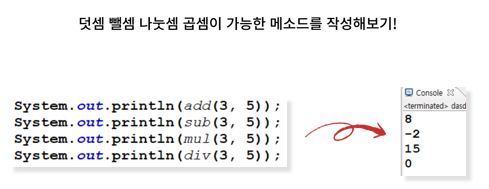
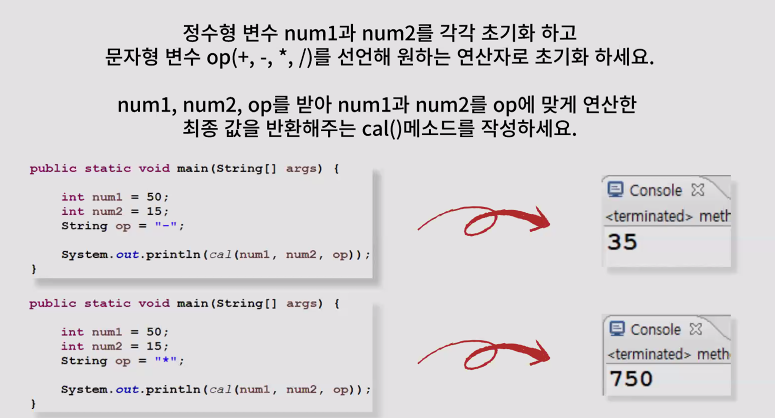
public class Ex09_계산기 {

	public static void main(String[] args) {
		System.out.println(add(3, 5));
		System.out.println(sub(3, 5));
		System.out.println(mul(3, 5));
		System.out.println(div(3, 5));
	}

	public static int add(int a, int b) {
		return a + b;
	}

	public static int sub(int a, int b) {
		return a - b;
	}

	public static int mul(int a, int b) {
		return a * b;
	}

	public static double div(int a, int b) {
		return (double)a / b;
	}
}
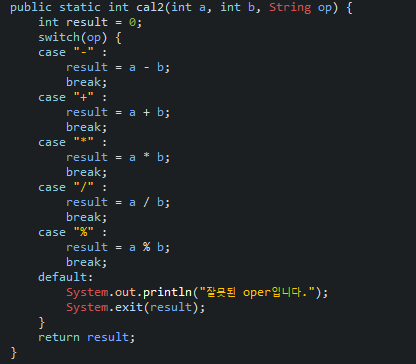
public class Ex10_계산기2 {

	public static void main(String[] args) {
		int num1 = 50;
		int num2 = 15;
		String op = "-";

		System.out.println(cal(num1, num2, op));
	}

	public static int cal(int a, int b, String op) {
		int result = 0;
		if(op.equals("+"))
			result = a+b;
		else if(op.equals("-"))
			result = a-b;
		else if(op.equals("*"))
			result = a*b;
		else if(op.equals("/"))
			result = a/b;
		else if(op.equals("%"))
			result = a%b;
		else {
			System.out.println("잘못 입력하셨습니다.");
			System.exit(result);
		}
		return result;
	}

}
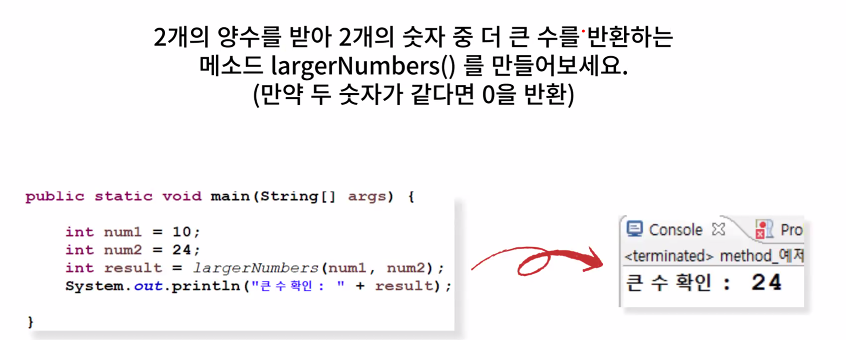
import java.util.Scanner;

public class Ex11_더큰수 {

	public static void main(String[] args) {
		Scanner sc = new Scanner(System.in);

		System.out.print("첫번째 수 입력 : ");
		int num1 = sc.nextInt();
		System.out.print("두번째 수 입력 : ");
		int num2 = sc.nextInt();

		int result = largerNumbers(num1, num2);
		System.out.println("큰 수 확인 : " + result);
	}

	public static int largerNumbers(int num1, int num2) {
		int result = 0;

		if (num1 > num2) {
			return num1;
		} else if (num2 > num1) {
			return num2;
		} else
			return 0;

		// 삼항 연산자 사용
//		if(num1==num2)
//		{
//			return 0;
//		}else {
//			return result = num1>num2?num1:num2;
//		}

	}

}
import java.util.Scanner;

public class Ex12_가까운수 {

	public static void main(String[] args) {

		Scanner sc = new Scanner(System.in);
		System.out.print("첫번째 수 입력 : ");
		int num1 = sc.nextInt();
		System.out.print("두번째 수 입력 : ");
		int num2 = sc.nextInt();

		System.out.print("비교 할 수 입력 : ");
		int num3 = sc.nextInt();

//		int num1 = 11;
//		int num2 = 5;

		int result = close(num1, num2, num3);
		System.out.println(num3 + "에 가까운 수 : " + result);
	}


	public static int close(int num1, int num2, int num3) {
		int result = 0;

		// 절대값을 구해주는 메소드-> abs();

//		int a = Math.abs(10-num1);
//		int b = Math.abs(10-num2);
//		int a = num3 - num1;
//		int b = num3 - num2;
//
//		if (a < 0) {
//			a *= (-1);
//		}
//		if (b < 0) {
//			b *= (-1);
//		}
//
//		if (a < b) {
//			return num1;
//		} else if (a > b) {
//			return num2;
//		} else
//			return 0;


		return Math.abs(num3-num1) < Math.abs(num3-num2) ? num1:num2;

	}

}

import java.util.Arrays;

public class Ex13_배열출력 {

	public static void main(String[] args) {
		int[] array = {1,3,4,8,7,9,10};
		arrayToString(array);
	}

	public static void arrayToString(int[] array) {

		// 1. for문을 통해서 출력
		for(int i =0; i<array.length;i++) {
			System.out.print(array[i]+" ");
		}
		System.out.println();
		// 2. 메소드를 통해서 출력 -> Arrays.toString();
		System.out.print(Arrays.toString(array));
	}

}
'ESG' 카테고리의 다른 글
| [2022년 청년친화형 기업 ESG지원 사업 - 11] (0) | 2022.09.20 |
|---|---|
| [2022년 청년친화형 기업 ESG지원 사업 - 10] (0) | 2022.09.19 |
| [2022년 청년친화형 기업 ESG지원 사업 - 8] (0) | 2022.09.16 |
| [2022년 청년친화형 기업 ESG지원 사업 - 7] (0) | 2022.09.15 |
| [2022년 청년친화형 기업 ESG지원 사업 - 6] (0) | 2022.09.14 |


