
ALLYES
[2022년 청년친화형 기업 ESG지원 사업 - 7] 본문
일시 : 2022.09.15
시간 : 9:00~ 18:00
오전 : DB
오후 :
오전 Database
지난 시간 복습
sum, avg : 숫자 데이터
max, min, count : 모든 데이터 가능
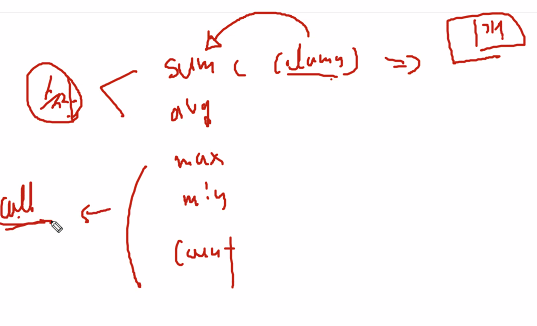
select count(distinct department_id)
from employees;

//select count(department_id) => 이때 all이 생략이 되어 있음
이때 쓰인 distinct는 함수에서 쓰이는 옵션, 전체적인 문장에 영향 x
select distinct count(department_id)
from employees;
department_id를 센 이후에 중복제거가 실행이 됨
select avg(commission_pct) , sum(commission_pct)
from employees;
그룹 함수 => null 무시
값만 입력 받기 때문에 값이 아닌 null은 무시가 됨
select avg(nvl(commission_pct,0)), sum(commission_pct)/107
from employees;
nvl이 먼저 실행이 되고 평균, 합계가 출력이 됨
문제 : 부서별 월 급여의 총합을 구하세요.
//department_id : 그룹화가 되지 않아 에러 발생
// 해결 하기 위해 소그룹을 생성해주는 group by절 등장
select department_id, sum(salary)
from employees
group by department_id;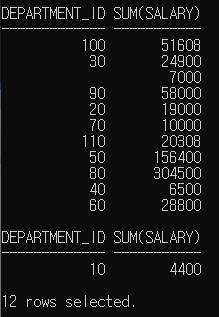
select 목록의 열 중 그룹 함수에 없는 열은 모두 group by절에 포함
ex) a, b, sum(sal)이면 a,b는 group by절에 포함 되어야함
각 절의 위치와 실행 순서
select 4
from 1
where 2
group by 3
order by 5
select department_id dept_id, job_id, sum(salary)
from employees
group by department_id, job_id;
// 부서별, 직급별 급여의 총 합
// order by, distinct : 멀티플 그룹화 현상 발생
select department_id, avg(salary)
from employees
where avg(salary) > 8000
group by department_id

//실행순서로 인하여 에러 발생
이를 해결하기 위해서 ...
select department_id, avg(salary)
from employees
having avg(salary) > 8000
group by department_id
조건절
- where : 행에 대한 조건절
- col > 1000
- having : 그룹에 대한 조건절
- avg(col) > 1000
- 컬럼에 그룹함수가 붙어 있음
- where과 having 절을 같이 쓸 수 있으나 성능이 떨어짐
실행 순서
select 5
from 1
where 2
group by 3
having 4
order by 6
select job_id, sum(salary) payroll
from employees
where job_id not like '%REP%'
group by job_id
having sum(salary) > 13000
order by sum(salary);
// 직업 이름에 REP가 들어가지 않고 급여가 13000인 것을 출력


// having절은 혼자서 사용 불가능
// group by절은 혼자 사용 가능
!!에러 발생!!
select department_id, max(avg(salary))
from employees
group by department_id;
group by => 소그룹 발생
avg(salary)에서 한개의 값만 나오기 때문에 그룹화가 진행되지않아 에러 발생!!
!!에러 발생!!
select department_id, max(avg(salary))
from employees;
문제 21 : 회사 전체의 최대 급여, 최소 급여, 급여 총 합 및 평균 급여를 출력하시오.
select max(salary), min(salary), sum(salary), avg(salary)
from employees;
문제 22 : 각 직업별, 최대 급여, 최소 급여, 급여 총 합 및 평균 급여를 출력하시오. 단, 최대 급여는 MAX, 최소 급여는 MIN, 급여 총 합은 SUM 및 평균 급여는 AVG로 출력하고, 직업을 오름차순으로 정렬하시오.
select job_id, max(salary) as max, min(salary) as min, sum(salary) as sum, avg(salary) as avg
from employees
group by job_id
order by job_id;
문제 23. 100번 부서를 제외한 각 부서별 평균급여가 7000이상인 부서를 출력하시오.
>> in 은 다수의 값을 찾을 때 사용함, 값이 지정되어있는 100같은 경우에는 단일연산자로 사용할것! => 결과는 같으나 처리되는 과정이 다름
select department_id, avg(salary)
from employees
where department_id != 100
group by department_id
having avg(salary) >= 7000;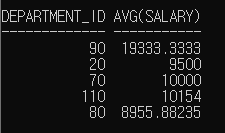
문제 24. 50번 부서에 근무하는 매니저별 평균 급여를 출력하시오.
// where절에 department 조건이 있기 때문에 select, group by에 department_id를 명시할 필요가 없음
select manager_id, avg(salary)
from employees
where department_id = 50
group by manager_id;
문제 25. 동일한 직업을 가진 사원들의 총 수를 출력하시오.
select job_id, count(employee_id)
from employees
group by job_id;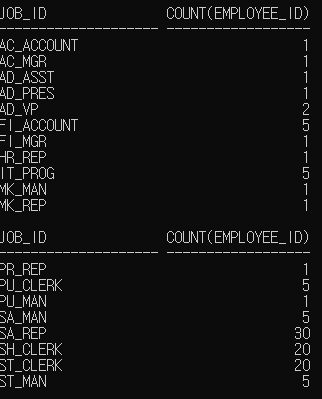
group by절로 인해 job_id를 소그룹화 시킴
count( ) : last_name or employee_id
group by : 똑같은 아이들끼리(중복된 행들) 그룹화가 진행되어 그룹이 생성이 됨.
문제 26. 직원이 4명 이상인 부서의 부서번호와 인원을 출력하시오
select department_id, count(employee_id)
from employees
group by department_id
having count(employee_id) >= 4;
문제 27. 매니저로 근무하는 사원들의 총 수를 출력하시오.
1. select manager_id
2. select count(manager_id)
3. select count(distinct manger_id) // 중복을 없애기 위해
select count(distinct manager_id)
from employees;
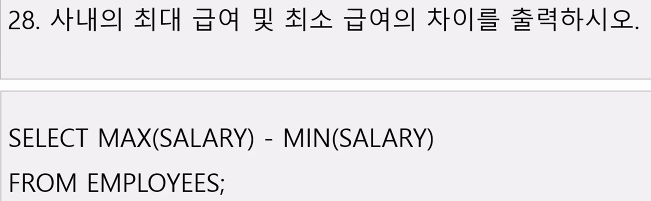
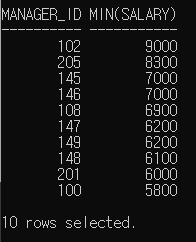
문제 29. 매니저의 사번 및 그 매니저 밑 사원들 중 최소 급여를 받는 사원의 급여를 출력하시오.
- 매니저가 없는 사람들은 제외
- 최소 급여가 5000 미만인 경우는 제외
- 급여 기준 역순으로 조회
select manager_id, min(salary)
from employees
where manager_id is not null
group by manager_id
having min(salary) >= 5000
order by min(salary) desc;
order by절 : select에 명시된 컬럼들을 정렬 해주는 것. => salary (x) min(salary) (O)
manager_id를 기준으로 group by절 실행
나머지 조건 명시
오후 Java
데이터 타입
- 레퍼런스 타입 : String, Scanner, ... 등
- 기본 데이터 타입 : int, short, long, byte, char, float, double, boolean

Java 실습1
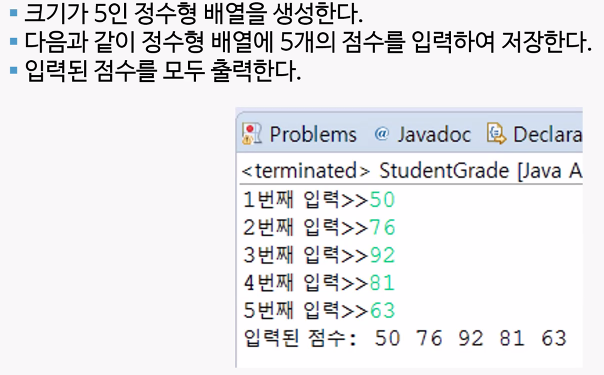
import java.util.Scanner;

public class Ex02_배열1 {
	public static void main(String[] args) {

		// 스캐너 입력받기
		Scanner sc = new Scanner(System.in);

		// 크기가 5인 정수형 배열 선언
		int[] array = new int[5];

		// 수 입력 받기
		for (int i = 0; i < array.length; i++) {
			System.out.print(i + 1 + "번째 입력 >> ");
			array[i] = sc.nextInt();
		}
		System.out.print("입력된 점수 : ");
		for (int i = 0; i < array.length; i++) {
			System.out.print(array[i] + " ");
		}
	}

}
import java.util.Scanner;
public class Ex03_배열2 {
public static void main(String[] args) {
// TODO Auto-generated method stub
Scanner sc = new Scanner(System.in);
int[] array = new int[5];
for(int i = 0; i < array.length; i++) {
System.out.print(i+1 + "번째 입력 : ");
array[i] = sc.nextInt();
}
System.out.print("입력된 점수 : ");
int max = array[0]; // 최고 점수
int min = array[0]; // 최저 점수
int sum = 0; // 총합
for(int i =0; i <array.length; i++) {
System.out.print(array[i] + " ");
if(array[i]>max) {
max = array[i];
}
if(array[i]<min) {
min = array[i];
}
sum += array[i];
}
double avg = (double)sum/array.length; // 평균
System.out.println();
System.out.println("최고 점수 : " + max);
System.out.println("최저 점수 : " + min);
System.out.println("총합 : " + sum);
System.out.println("평균 : " + avg);
}
}Java 실습2
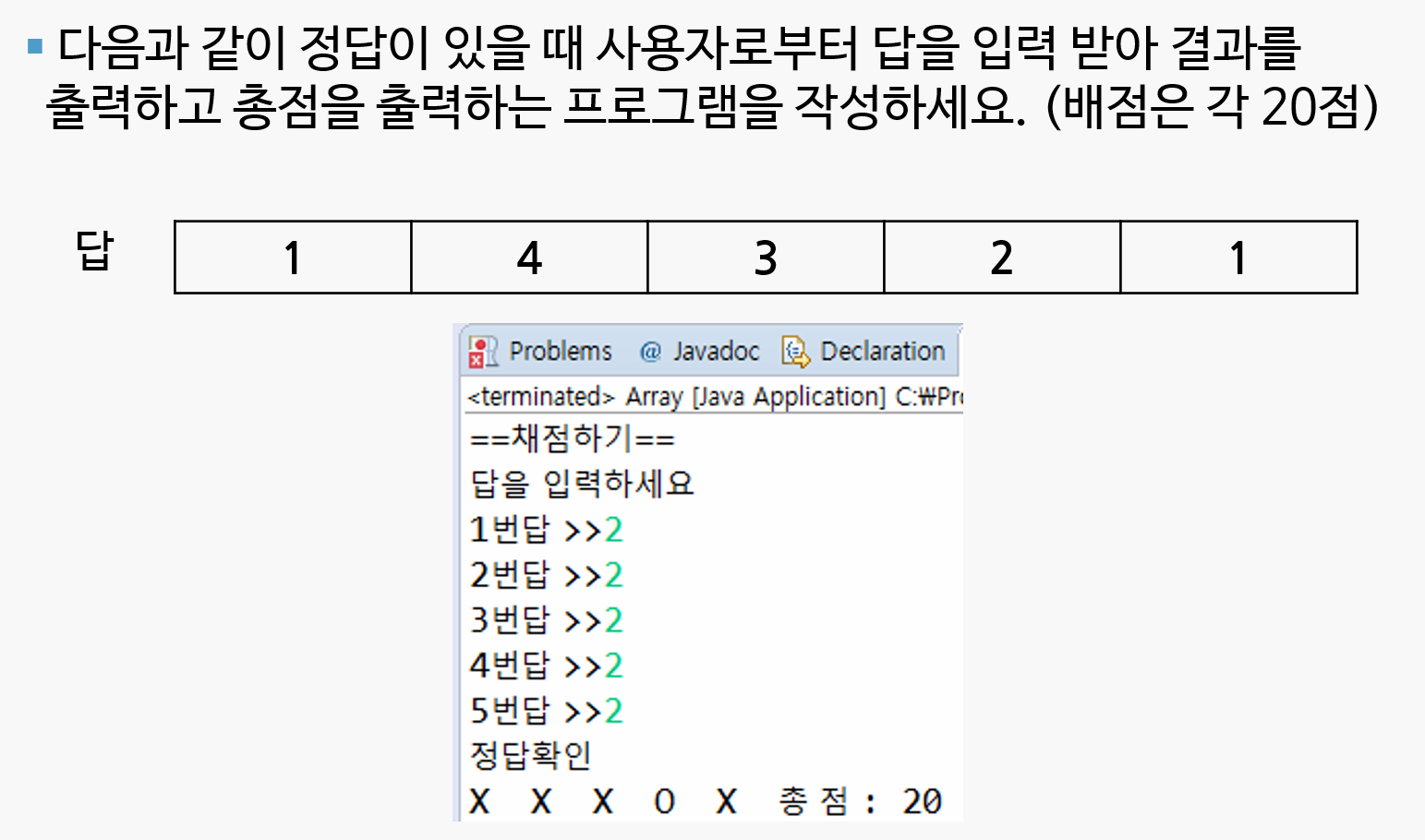
import java.util.Scanner;

public class Ex04_배열3 {

	public static void main(String[] args) {
		// TODO Auto-generated method stub

		Scanner sc = new Scanner(System.in);


		int[] ans = { 1, 4, 3, 2, 1 };		// 정답 입력
		int[] pans = new int[ans.length];	// 입력받을 배열
		int sum = 0;				// 총점

		System.out.println("== 채점하기 ==");
		System.out.println("답을 입력하세요.");

		// 정답 입력 받기
		for (int i = 0; i < ans.length; i++) {
			System.out.print(i + 1 + "번답 >> ");
			pans[i] = sc.nextInt();
		}

		System.out.println();

		//정답 확인
		System.out.println("정답확인");
		for (int i = 0; i < ans.length; i++) {
			// 입력된 값과 입력받은 값 비교
			if (ans[i] == pans[i]) {
				System.out.print("O" + " ");
				sum += 20;
			} else
				System.out.print("X"+ " ");
		}
		System.out.println("총점 : " + sum);

	}

}
# for문 1개만 쓴 것
import java.util.Scanner;

public class Ex03_배열실습 {
   public static void main(String[] args) {
      Scanner sc = new Scanner(System.in);
      int[] num = {1, 4, 3, 2, 1};
      int[] ans = new int[5];
      int score = 0;
      String a = "";

      System.out.println("==채점하기==\n답을 입력하세요");
      for(int i = 0; i < num.length; i++) {
         System.out.print(i+1 + "번답 >> ");
         ans[i] = sc.nextInt();
         if(ans[i] == num[i]) {
            a += "O ";
            score += 20;
         }else {
            a += "X ";
         }
      }
      System.out.println("정답확인");
      System.out.println(a + "총점: " + score);
   }
}
Java 실습3
public class Ex05_배열4 {

	public static void main(String[] args) {
		// TODO Auto-generated method stub
		int[] starcount = { 3, 4, 4, 2, 1 };

		for(int i =0; i <starcount.length; i++) {
			System.out.print(starcount[i]+":");

			for(int k = 0; k<starcount[i]; k++) {
				System.out.print("*");
			}
			System.out.println();
		}

	}

}
Java 실습4 - foreach문

public class Ex07_foreach문1 {

	public static void main(String[] args) {
		// TODO Auto-generated method stub
		int[] array = {1,2,3,5,7,34,22,71,9};
		int cnt = 0;

		System.out.print("array에 들어있는 홀수는 ");
		for(int odd : array) {
			if(odd%2 ==1) {
				System.out.print(odd + " ");
				cnt++;
			}
		}
		System.out.println("\n총 " + cnt + "개 입니다.");
	}
}
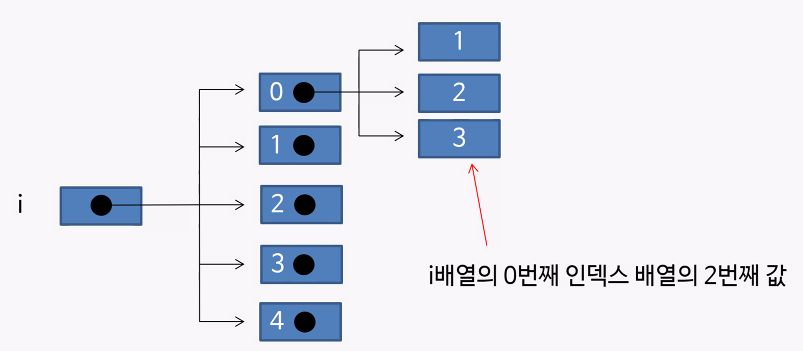
이차원 배열
- 1차원 배열안에 1차원 배열이 있는 것이 2차원 배열


public class Ex08_이차원배열 {

	public static void main(String[] args) {
		int[] Score_1반 = { 80, 70, 60, 90 };
		int[] Score_2반 = { 85, 75, 65, 95 };
		int[] Score_3반 = { 82, 72, 62, 92 };

		int total_1반 = 0;
		int total_2반 = 0;
		int total_3반 = 0;

		for (int i = 0; i < Score_1반.length; i++) {
			total_1반 += Score_1반[i];
			total_2반 += Score_2반[i];
			total_3반 += Score_3반[i];
		}

		int avg = (total_1반 / Score_1반.length + total_2반 / Score_2반.length + total_3반 / Score_3반.length) / 3;
		System.out.println(avg);

		int[][] score = { { 80, 70, 60, 90 }, { 85, 75, 65, 95 }, { 82, 72, 62, 92 } };

		System.out.println(score);
		System.out.println(score.length);
		System.out.println(score[0]);
		System.out.println(score[0].length);
		System.out.println(score[1]);
		System.out.println(score[1].length);

		int total= 0;

		for(int i = 0; i < score.length; i++) {
			for(int k = 0; k<score[i].length; k++) {
				total += score[i][k];
			}
		}
	}

}
'ESG' 카테고리의 다른 글
| [2022년 청년친화형 기업 ESG지원 사업 - 9] (0) | 2022.09.17 |
|---|---|
| [2022년 청년친화형 기업 ESG지원 사업 - 8] (0) | 2022.09.16 |
| [2022년 청년친화형 기업 ESG지원 사업 - 6] (0) | 2022.09.14 |
| [2022년 청년친화형 기업 ESG지원 사업 - 5] (0) | 2022.09.13 |
| [2022년 청년친화형 기업 ESG지원 사업 - 4] (0) | 2022.09.08 |


