
ALLYES
[2022년 청년친화형 기업 ESG지원 사업 - 13] 본문
일시 : 2022.09.22
시간 : 9:00 ~ 18:00
▶배열(Array)
- 개념
- 같은 타입의 데이터들을 하나로 묶어 다루는 구조
- 구조
- ex) 정수형 배열 : int[] arr = new int[5];
-
- 배열의 한계
- 배열 선언 시, 고정된 크기로 선언
- ArrayIndexOutofBoundsExcepton
- 배열의 크기에 벗어난 데이터를 넣을려고 하였을 때 발생하는 에러
- 배열의 한계
▶ ArrayList
- 개념
- 가장 보편적으로 많이 사용하는 컬렉션 클래스로 객체를 저장
- 크기가 고정이 아닌 가변의 길이
- 원하는 위치의 추가나 삭제가 쉬움
- 종류
- Ex) ArrayList<Integer> list1 = new ArrayList<integer>();
- ArrayList - 추가 : add
- list1.add(1) : 오른쪽 끝에 1이 추가
- list1.add(인덱스, 데이터) : 인덱스에 데이터를 넣는 형식, 원래 자리에 있던 데이터는 오른쪽으로 한칸씩 밀림
- ArrayList - 삭제 : remove
- list.remove(1) : 그 수를 삭제
- list.remove(list1.indexOf(2)) : 인덱스 자리에 있는 데이터 삭제
- ArrayList - 변경 : set
- ArrayList - 읽기 : get
- list1.get(1) : 특정 값 출력, 인덱스 1에 들어있는 값 출력
- indexOf
- index 의 위치를 찾는 함수
- ArrayList 값 검색
- int index = list1.indexOf(3) : 인덱스 3에 들어있는 값 출력, 없다면 -1 리턴
- boolean b = list1.contains(3) : 인덱스 3에 값의 유무
- ArrayList - 추가 : add
- Ex) ArrayList<Integer> list1 = new ArrayList<integer>();
- Collection
- 요소(Element)라고 불리는 가변 개수의 객체들의 집합
- 순서나 집합적인 저장공간
- 객체들의 컨테이너
- 요소의 개수에 따라 자동 크기 조절
- 요소의 추가, 삭제에 따른 요소의 이동 자동 관리
- 여러 개의 객체를 보관할 수 있게 만들어진 클래스들의 집합
- 고정 크기의 배열을 다루는 불편함 해소

import java.util.ArrayList;
import java.util.Scanner;

public class Ex01_practice {

	public static void main(String[] args) {
		// ArrayList - 크기가 기변적으로 변하는 배열의 형태를 가진 클래스
		// 일반적인 배열의 경우
		// 데이터 추가, 삭제 시 반복문으로 인덱스를 밀거나 당기는 식으로 공간 조절
		// ArrayList - 자동으로 이 과정을 처리 --> 편리하게 사용 가능

		// ArrayList 선언(정수형)
		// ArrayList<Integer> list1 = new ArrayList<Integer>();
		// ArrayList 선언(문자형)
		// ArrayList<String> list2 = new ArrayList<String>();
		// 생성자 타입 Parameter 생략이 가능하지만 가독성을 위해 생략하지 않음
		// ArrayList 선언(클래스형)
		// ArrayList<Person> list3 = new ArrayList<Person>();

		// < > --> Generic 기법(방식)
		// Generic 방식 - 타입을 미리 지정, 같은 타입의 객체들만 리스트에 추가 가능
		// < > 안에는 Element 요소

		// ArrayList 요소 추가
		ArrayList<Integer> list1 = new ArrayList<Integer>();
		list1.add(1);
		list1.add(3);
		list1.add(1, 2); // 첫번째 인덱스 2를 넣자
		System.out.println(list1);

		// ArrayList 요소 삭제
		list1.remove(2);
		System.out.println(list1);

		// ArrayList 전체 요소 삭제 - clear
		list1.clear();
		System.out.println(list1);

		// ArrayList 인덱스번호로 삭제하는 방법 말고
		// 데이터로 삭제하는 방법 - indexof : 리스트 중에서 데이터를 포함한 인덱스 리턴하고 삭제
		list1.add(1);
		list1.add(3);
		list1.add(1, 2);
		list1.remove(list1.indexOf(2));
		System.out.println(list1);
		System.out.println("====================");

		// ArrayList 값을 검색
		int index = list1.indexOf(3); // 3이라는 값의 인덱스를 리턴, 없으면 -1 리턴
		System.out.println(index);
		System.out.println("====================");
		boolean b = list1.contains(3);
		System.out.println(b);
		System.out.println("====================");

		// ArrayList 값 출력
		System.out.println(list1);
		System.out.println(list1.get(1));
		System.out.println("==========for-each문==========");

		for (int i : list1) { // 반복문을 돌면서 list1에 있는 요소들을 int i에 담아줌
			System.out.print(i + " ");

		}
		System.out.println();


	}

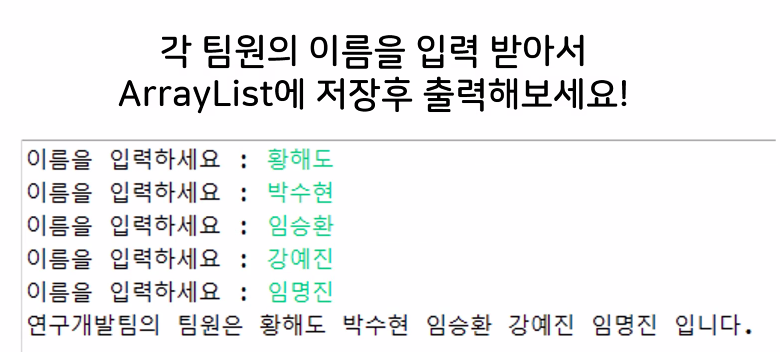
}- 실습문제
# 본인 코드
=> 결과가 배열 형태로 출력
import java.util.ArrayList;
import java.util.Scanner;

public class Ex01_practice {

	public static void main(String[] args) {

		ArrayList<String> list2 = new ArrayList<String>();
		String name;
		Scanner sc = new Scanner(System.in);
		for (int i = 0; i < 5; i++) {
			System.out.print("이름을 입력하세요 : ");
			name = sc.next();
			list2.add(name);
		}
		System.out.println("연구개발팀의 팀원은" + list2 +" 입니다.");

    }
}
# 강사 코드
=> 배열이 아닌 형태로 출력
import java.util.ArrayList;
import java.util.Scanner;

public class Ex02_Team {

	public static void main(String[] args) {
		// 각 팀원의 이름을 입력 받기
		// ArrayList 저장 후 출력!

		// 키보드 입력받기
		Scanner sc = new Scanner(System.in);
		ArrayList<String> list1 = new ArrayList<String>();

		// for문을 사용해서 이름을 입력!
		for(int i=0; i <= 4; i++) { // 0 1 2 4 5 --> 5번 반복
			System.out.print("이름을 입력하시오 : ");
			list1.add(sc.nextLine());
		}
		System.out.print("우리팀의 팀원은: ");
		// for-each문을 사용해서 팀원을 출력
		for(String st : list1) {
			System.out.print(st + " ");
		}
	}

}
실습문제 2
import java.util.ArrayList;
import java.util.Scanner;

public class Main {

	public static void main(String[] args) {
		// 학생1명의 정보를 Student 객체에 저장해주세요.
		Student stu = new Student("김다예", 24, '여', "010-1234-5678", "A+");
		Scanner sc = new Scanner(System.in);

		// 학생 객체를 ArrayList에 담아 저장해주세요.
		ArrayList<Student> st = new ArrayList<Student>();
		st.add(stu);

		// [1]등록 [2]조회 [3]삭제 [4]종료 기능 구현해주세요.

		String name;
		int stuId;
		char gender;
		String phone, grade;

		while (true) {
			System.out.println("[1]등록, [2]조회, [3]삭제, [4]종료 : ");
			int num = sc.nextInt();

			if (num == 1) {
				System.out.println("학생 정보를 입력하세요.");
				System.out.print("name : ");
				name = sc.next();
				System.out.print("stuId: ");
				stuId = sc.nextInt();
				System.out.print("gender: ");
				gender = sc.next().charAt(0);
				System.out.print("phone: ");
				phone = sc.next();
				System.out.print("grade: ");
				grade = sc.next();
				Student s = new Student(name, stuId, gender, phone, grade);
				st.add(s);
			} else if (num == 2) {
				System.out.println("학생 정보를 조회합니다.");
				int StuId = sc.nextInt();

				for (int i = 0; i < st.size(); i++) {
					if (st.get(i).getStuId() == StuId) { // stuId로하면 에러발생
						System.out.println(st.get(i).toString());
					}
				}

			} else if (num == 3) {
				System.out.println("학생 정보를 삭제합니다.");
				System.out.println("삭제 학번 입력 : ");
				int StuId = sc.nextInt();
				for (int i = 0; i < st.size(); i++) {
					if (st.get(i).getStuId() == StuId) { // stuId로하면 에러발생
						st.remove(i);
						System.out.println("삭제되었습니다.");
					}
				}
			} else if (num == 4) {
				System.out.println("종료 하겠습니다.");
			}

		}
	}

}
# 또다른 답
import java.util.ArrayList;
import java.util.Scanner;

public class StudentMain {
   public static void main(String[] args) {
      // 학생 1명의 정보를 Student 객체에 저장해주세요.
      Student s1 = new Student("kim", 20201111, 'M', "010.1111.1111", "4.3");
      Student tmp;
      String name = null;
      int stuId = 0;
      char gender = 0;
      String phone = null, grade = null;

      // 학생 객체를 ArrayList에 담에 저장해주세요.
      ArrayList<Student> arrStudent = new ArrayList<Student>();
      arrStudent.add(s1);

      Scanner sc = new Scanner(System.in);
      int num;
      while (true) {
         System.out.println("[1]등록, [2]조회, [3]삭제, [4]종료");
         System.out.print(": ");
         num = sc.nextInt();
         if (num == 1) {
            System.out.println("등록할 학생 정보를 입력하시오");
            System.out.print("name: ");
            name = sc.next();
            System.out.print("stuId: ");
            stuId = sc.nextInt();
            System.out.print("gender: ");
            gender = sc.next().charAt(0);
            System.out.print("phone: ");
            phone = sc.next();
            System.out.print("grade: ");
            grade = sc.next();

            tmp = new Student(name, stuId, gender, phone, grade);
            arrStudent.add(tmp);
            System.out.println();
         } else if (num == 2) {
            int flag = 0;
            System.out.println("조회할 학생 정보를 입력하시오");
            System.out.print("stuId: ");
            stuId = sc.nextInt();
            for (int i = 0; i < arrStudent.size(); i++) {
               if (arrStudent.get(i).getStuId() == stuId) {
                  System.out.println(arrStudent.get(i));
                  System.out.println("조회되었습니다");
                  flag = 1;
                  break;
               }
            }
            if (flag == 0)
               System.out.println("잘못된 정보입니다");
            System.out.println();
         } else if (num == 3) {
            int flag = 0;
            System.out.println("삭제할 학생 정보를 입력하시오");
            System.out.print("stuId: ");
            stuId = sc.nextInt();
            for (int i = 0; i < arrStudent.size(); i++) {
               if (arrStudent.get(i).getStuId() == stuId) {
                  arrStudent.remove(i);
                  System.out.println("삭제되었습니다");
                  flag = 1;
                  break;
               }
            }
            if (flag == 0)
               System.out.println("잘못된 정보입니다");
            System.out.println();
         } else if(num == 4) {
            System.out.println("종료합니다");
            break;
         } else {
            System.out.println("번호를 다시 입력하세오\n");
         }
      }
   }
}
점심시간
실습예제1

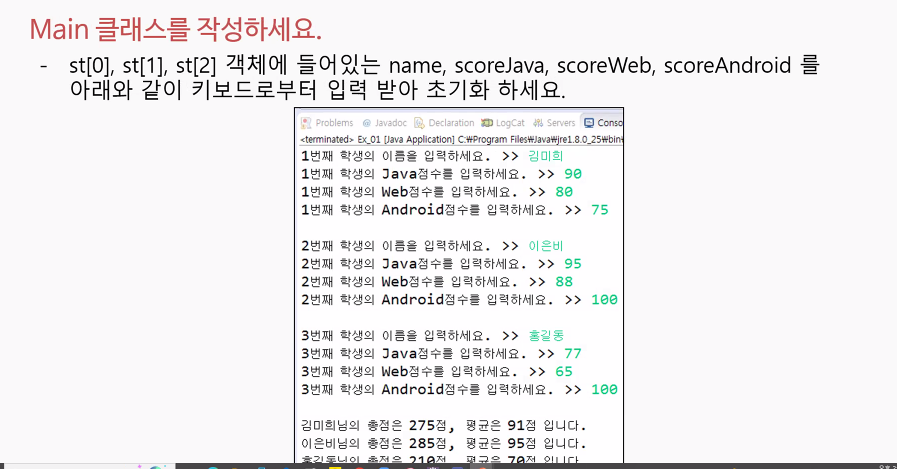
# StudentScore 클래스
package 오후;

public class StudentScore {
	// 필드 정의
	private String name;	// 학생이름
	private int scoreJava;	// Java점수
	private int scoreWeb;	// Web점수
	private int scoreAndroid;	// Android점수

	// 생성자 생성
	// 초기화
	public StudentScore(String name, int scoreJava, int scoreWeb, int scoreAndroid) {
		this.name = name;
		this.scoreJava = scoreJava;
		this.scoreWeb = scoreWeb;
		this.scoreAndroid = scoreAndroid;
	}

	public String getName() {
		return name;
	}

	public int getScoreJava() {
		return scoreJava;
	}

	public int getScoreWeb() {
		return scoreWeb;
	}

	public int getScoreAndroid() {
		return scoreAndroid;
	}


}
# StudentScoreMain 클래스
package 오후;

import java.util.ArrayList;
import java.util.Scanner;

public class StudentScoreMain {

	public static void main(String[] args) {
		// StudentScore 객체 배열에 대한 레퍼런스 변수 선언
		StudentScore[] ssArray;

		// 3명의 학생 데이터를 입력할 수 있도록 StudentScore 객체 배열 생성
		ssArray = new StudentScore[3];

		// 스캐너 객체
		Scanner sc = new Scanner(System.in);
		String name;
		int ScoreJava;
		int ScoreWeb;
		int ScoreAndroid;

		// 레퍼런스 변수 : 비어있는 변수
		// ssArray[]

		for(int i = 0; i <3; i++) {
			System.out.print(i+1 + "번째 학생의 이름을 입력하세요. >>");
			name = sc.next();
			System.out.print(i+1 + "번째 학생의 Java 점수를 입력하세요. >>");
			ScoreJava = sc.nextInt();
			System.out.print(i+1 + "번째 학생의 Web 점수를 입력하세요. >>");
			ScoreWeb = sc.nextInt();
			System.out.print(i+1 + "번째 학생의 Android 점수를 입력하세요. >>");
			ScoreAndroid = sc.nextInt();
			System.out.println();
			ssArray[i] = new StudentScore(name, ScoreJava, ScoreWeb, ScoreAndroid);

		}
		for(int i=0; i<3; i++) {
		int sum = ssArray[i].getScoreJava() +ssArray[i].getScoreWeb() + ssArray[i].getScoreAndroid();
		int avg = sum/3;
		System.out.println(ssArray[i].getName() + "님의 총점은 " + sum + "점, 평균은 " + avg + "점 입니다.");
		}


	}

}
실습예제2
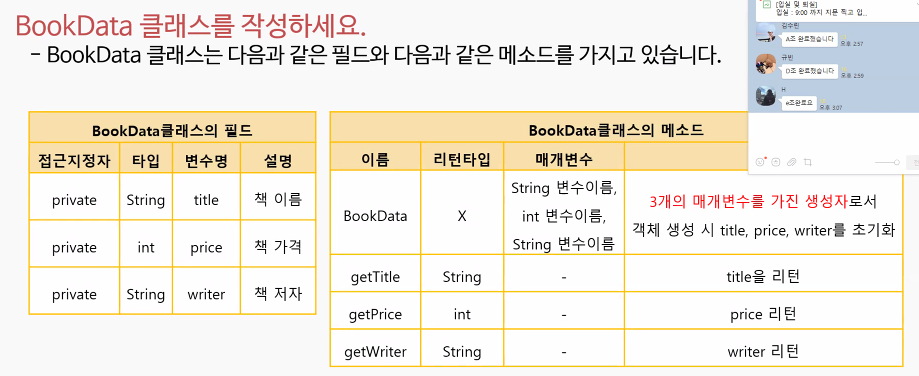

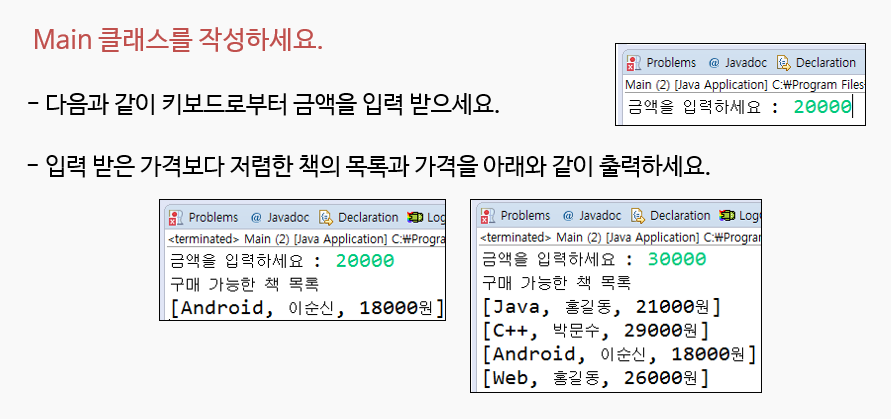
package 오후;

public class BookData {

	// 필드 정의
	private String title; // 책 이름
	private int price; // 책 가격
	private String writer; // 책 저자

	// 기본 생성자 선언
	public BookData(String title, int price, String writer) {
		this.title = title;
		this.price = price;
		this.writer = writer;
	}

	public String getTitle() {
		return title;
	}

	public int getPrice() {
		return price;
	}

	public String getWriter() {
		return writer;
	}

}
package 오후;
import java.util.Scanner;
public class BookDataMain {
public static void main(String[] args) {
BookData[] bd = new BookData[5];
bd[0] = new BookData("Java", 21000, "홍길동");
bd[1] = new BookData("C++", 20000, "박문수");
bd[2] = new BookData("Database", 31000, "김장독");
bd[3] = new BookData("Android", 18000, "이순신");
bd[4] = new BookData("Web", 26000, "김철수");
Scanner sc = new Scanner(System.in);
int price;
System.out.print("금액을 입력하세요 : ");
price = sc.nextInt();
System.out.println("구매 가능한 책 목록");
for (int i = 0; i < 5; i++) {
if (price > bd[i].getPrice()) {
System.out.println("[" + bd[i].getTitle() + ", " + bd[i].getWriter() + ", " + bd[i].getPrice()+" 원 ]");
}
}
}
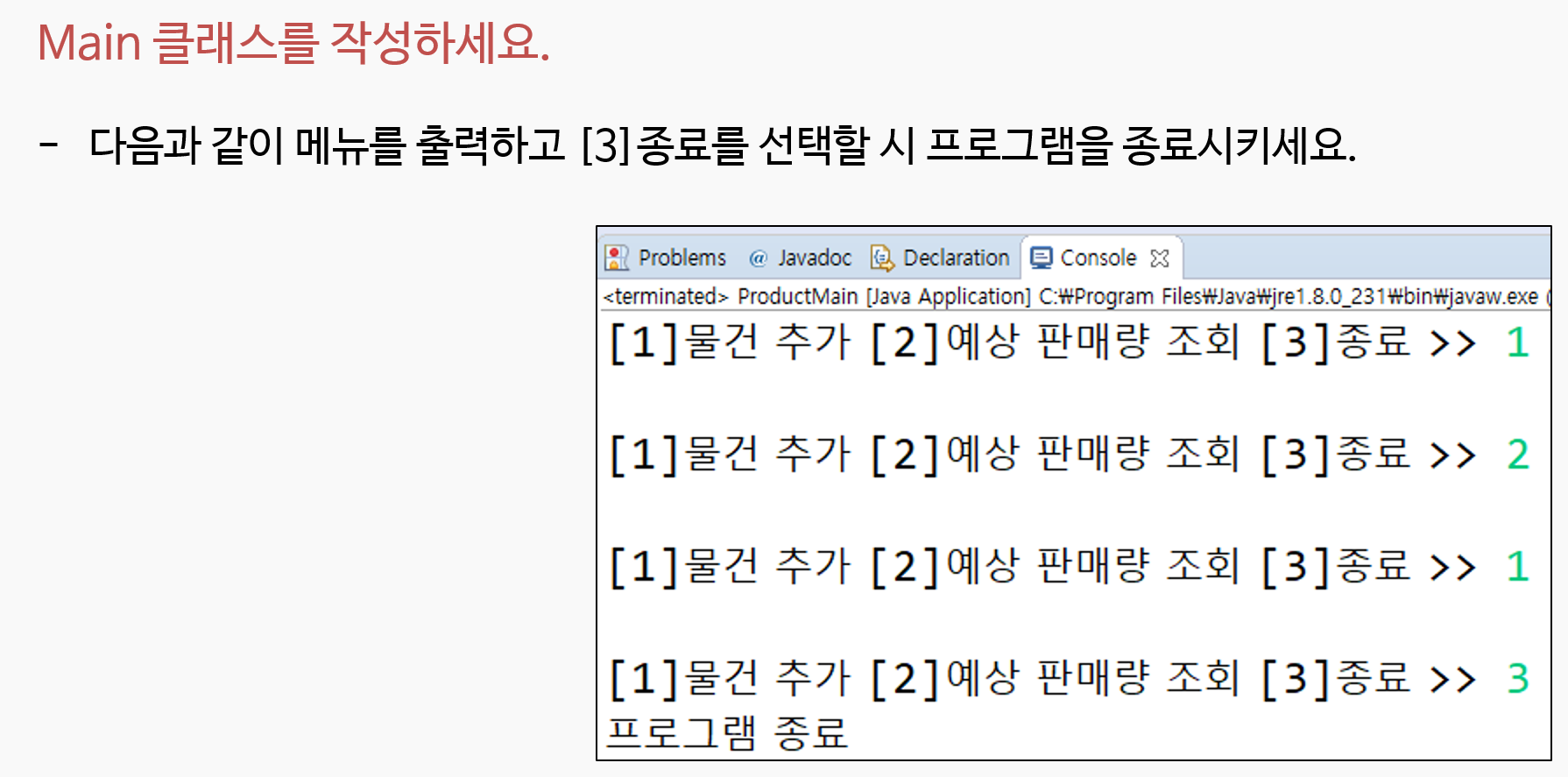
}
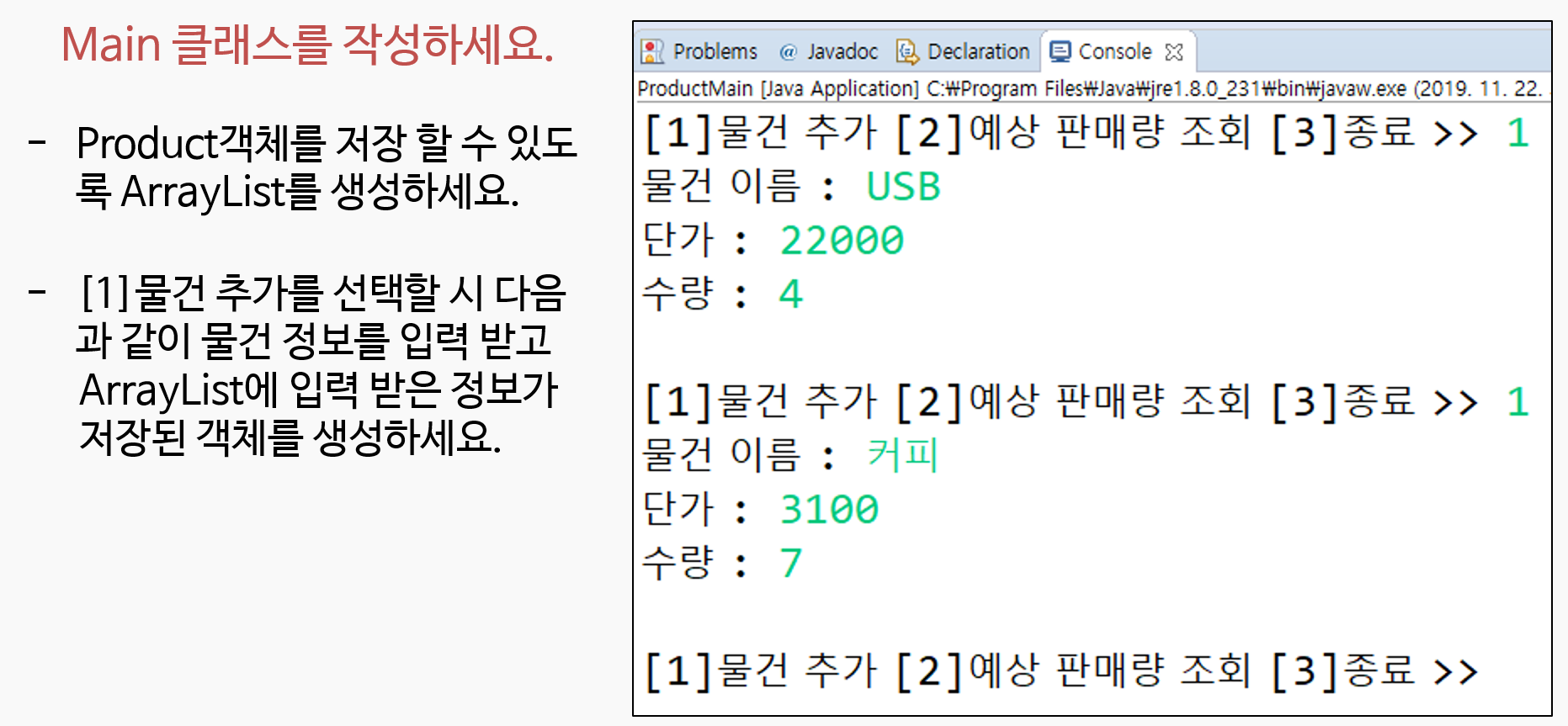
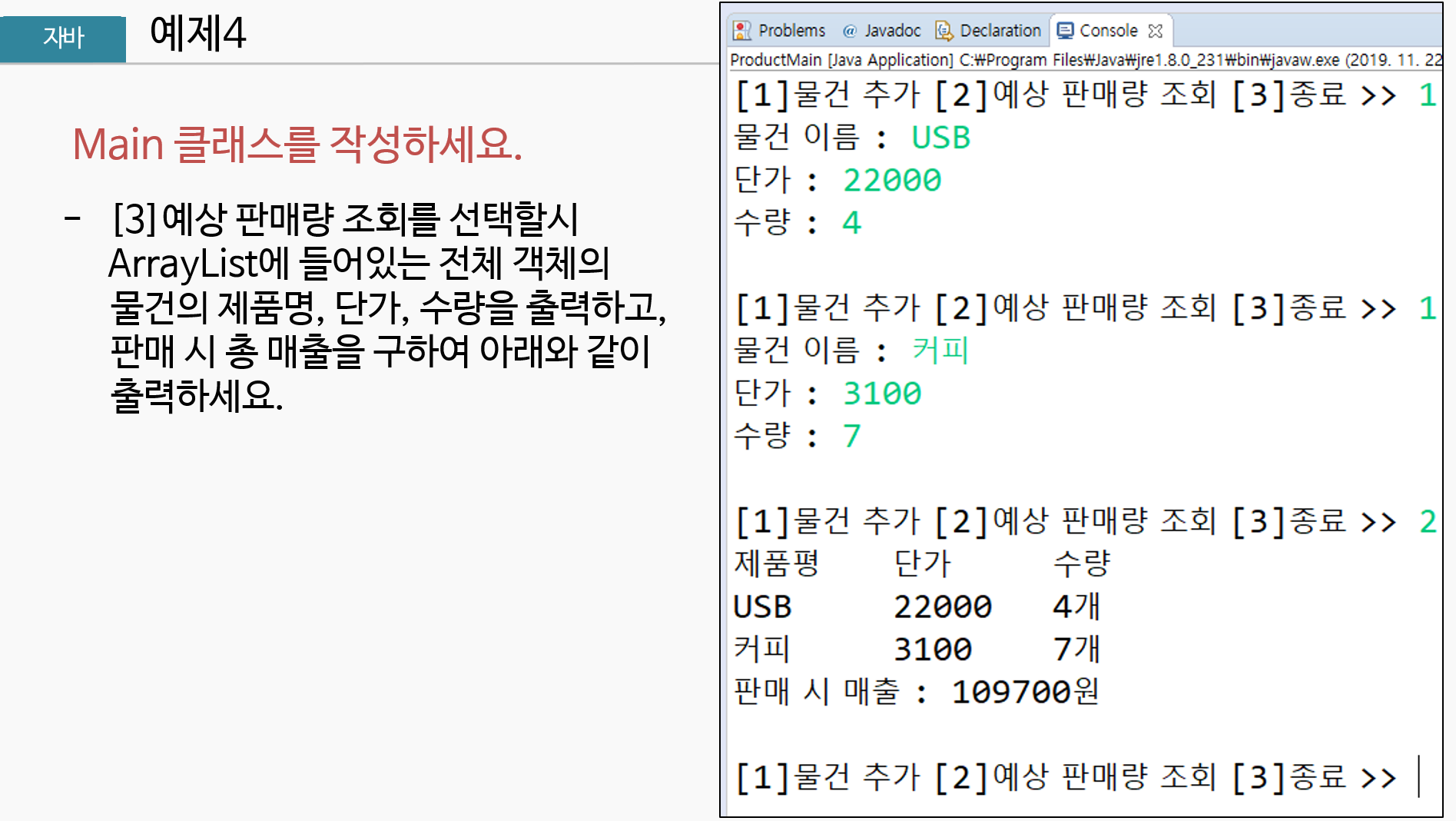
package 오후;

public class Product {
	private String name;
	private int unitPrice;
	private int amount;

	public Product(String name, int unitPrice, int amount) {
		this.name = name;
		this.unitPrice = unitPrice;
		this.amount = amount;
	}

	public String getName() {
		return name;
	}

	public int getUnitPrice() {
		return unitPrice;
	}

	public int getAmount() {
		return amount;
	}


}
package 오후;
import java.util.ArrayList;
import java.util.Scanner;
public class ProductMain {
public static void main(String[] args) {
// 객체 생성
ArrayList<Product> p = new ArrayList<Product>();
Scanner sc = new Scanner(System.in);
int result = 0;
while (true) {
System.out.print("[1] 물건추가 [2] 예상 판매량 조회 [3] 종료 >> ");
int num = sc.nextInt();
if (num == 1) {
System.out.print("물건이름 : ");
String name = sc.next();
System.out.print("단가 : ");
int unitPrice = sc.nextInt();
System.out.print("수량 : ");
int amount = sc.nextInt();
Product p1 = new Product(name, unitPrice, amount);
p.add(p1);
} else if (num == 2) {
System.out.println("제품명\t단가\t수량");
for(int i = 0; i<p.size();i++) {
System.out.println(p.get(i).getName()+ "\t" + p.get(i).getUnitPrice() + "\t" + p.get(i).getAmount() );
result += p.get(i).getUnitPrice() * p.get(i).getAmount();
}
System.out.println("판매 시 매출 : " + result);
} else if (num == 3) {
System.out.println("프로그램 종료");
break;
}
}
}
}'ESG' 카테고리의 다른 글
| [2022년 청년친화형 기업 ESG지원 사업 - 15] (0) | 2022.09.24 |
|---|---|
| [2022년 청년친화형 기업 ESG지원 사업 - 14] (0) | 2022.09.23 |
| [2022년 청년친화형 기업 ESG지원 사업 - 12] (0) | 2022.09.21 |
| [2022년 청년친화형 기업 ESG지원 사업 - 11] (0) | 2022.09.20 |
| [2022년 청년친화형 기업 ESG지원 사업 - 10] (0) | 2022.09.19 |
'ESG' Related Articles
more


