
ALLYES
[2022년 청년친화형 기업 ESG지원 사업 - 14] 본문
일시 : 2022.09.23
시간 : 9:00 ~ 18:00
실습예제1.
 |
 |
 |
 |
 |
 |
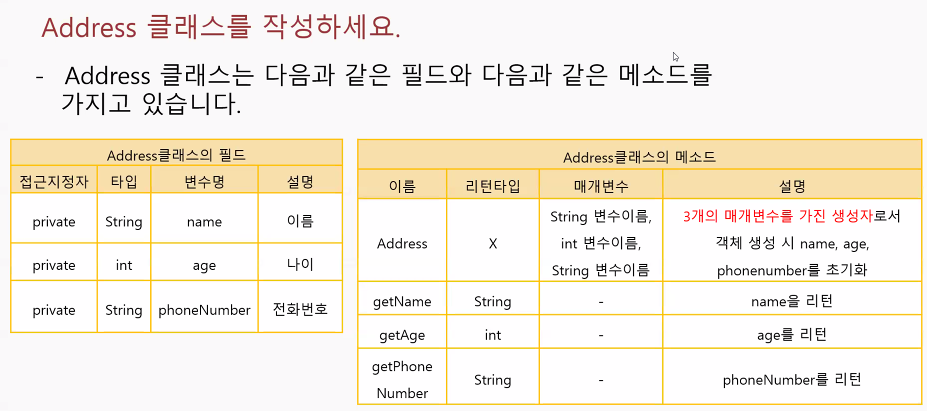
- Address 클래스
public class Address {
	//필드 구성
	private String name;		//이름
	private int age;			//나이
	private String phonenumber;	//전화번호

	//생성자 : 객체를 생성함
	//생성자 = 클래스 이름
	public Address(String name, int age, String phonenumber) {
		this.name = name;
		this.age = age;
		this.phonenumber = phonenumber;
	}

	//메소드 구성
	//Getter 생성
	public String getName() {
		return name;
	}

	public int getAge() {
		return age;
	}

	public String getPhonenumber() {
		return phonenumber;
	}

// toString을 쓰면 가독성이 좋아짐
//	@Override
//	public String toString() {
//		// TODO Auto-generated method stub
//		return super.toString();
//	}

}- AddressMain 클래스
import java.util.ArrayList;
import java.util.Scanner;

public class AddressMain {

	public static void main(String[] args) {
		Scanner sc = new Scanner(System.in);
		ArrayList<Address> adr = new ArrayList<Address>();

		while (true) {
			System.out.print("[1]추가 [2]전체조회 [3]삭제 [4]검색 [5]종료 >> ");
			int check = sc.nextInt();
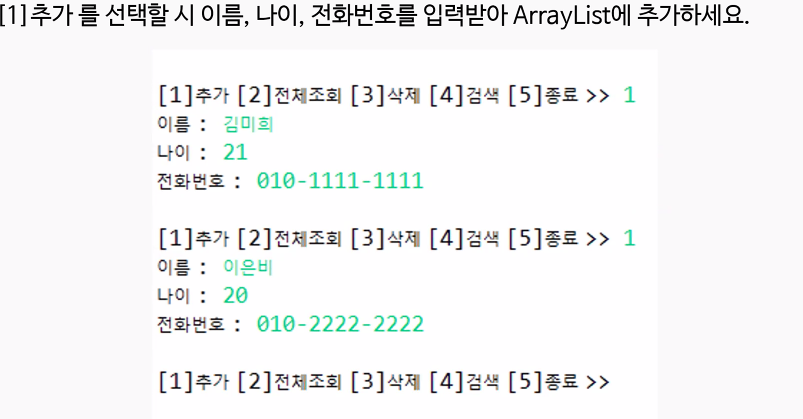
			if (check == 1) { // 추가
				System.out.println("정보를 입력하세요");
				System.out.print("이름 : ");
				String name = sc.next();
				System.out.print("나이 : ");
				int age = sc.nextInt();
				System.out.print("전화번호 : ");
				String phonenum = sc.next();
				Address adr1 = new Address(name, age, phonenum);
				adr.add(adr1);
				System.out.println();
			} else if (check == 2) { // 전체조회
				System.out.println("전체조회를 시작하겠습니다.");
				for (int i = 0; i < adr.size(); i++) {
					System.out.println(i + 1 + "\t" + adr.get(i).getName() + "\t" + adr.get(i).getAge() + "\t"
							+ adr.get(i).getPhonenumber());
				}
				if (adr.size() == 0) {
					System.out.println("등록된 연락처가 없습니다.");
				}
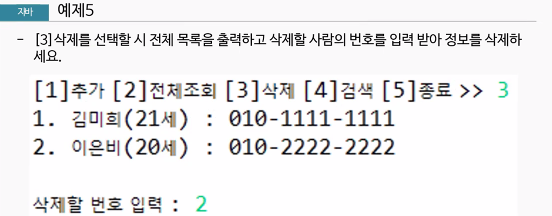
			} else if (check == 3) { // 삭제
				if (adr.size() == 0) {
					System.out.println("등록된 연락처가 없습니다.");
				} else {
					System.out.print("삭제할 번호 입력 : ");
					for (int i = 0; i < adr.size(); i++) {
						System.out.println(i + 1 + "\t" + adr.get(i).getName() + "\t" + adr.get(i).getAge() + "\t"
								+ adr.get(i).getPhonenumber());
					}
					int num = sc.nextInt();
					if (num > adr.size()) {
						System.out.println("없는 번호를 입력하셨습니다.");
						continue;
					} else {
						adr.remove(num - 1);
					}
				}
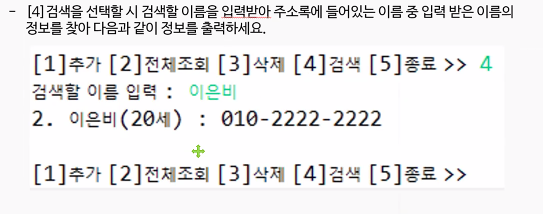
			} else if (check == 4) { // 검색
				if (adr.size() == 0) {
					System.out.println("등록된 정보가 없습니다.");
				} else {
					System.out.print("검색할 이름 입력 : ");
					String inputname = sc.next();
					int flag = 0;
					for (int i = 0; i < adr.size(); i++) {
						if (adr.get(i).getName().equals(inputname)) {
							System.out.println(i + 1 + "\t" + adr.get(i).getName() + "\t" + adr.get(i).getAge() + "\t"
									+ adr.get(i).getPhonenumber());
							flag = 1;
						}
					}
					if (flag == 0) {
						System.out.println("검색한 이름의 정보가 없습니다.");
					}
				}

			} else if (check == 5) { // 종료
				System.out.println("프로그램 종료");
				break;
			}

		}
	}
}
- indexOf(String s) Method
- 매개변수로 넣은 문자의 위치를 리턴 해주는 Method
- 주로 substring Method와 같이 쓰임
- String 클래스 안에 있는 Method
- contains Method
- 변수명.contains()
- 매개변수로 넣은 문자열이 포함되어 있는지 검사
- String 클래스 안에 있는 Method

예제1

import java.util.Scanner;

public class Ex01_ContainMethod {

	public static void main(String[] args) {
		Scanner sc = new Scanner(System.in);
		String data = "010-2407-1065";
		System.out.print("검색할 문자 입력 : ");
		String num = sc.next();

		if (data.contains(num)) {
			System.out.println(num + "은 포함이 되어있습니다.");

		} else {
			System.out.println(num + "은 문자열에 포함이 되어 있지 않습니다.");
		}

	}
}- substring Method
- 변수명.substring(int start, int end) : 시작 인덱스 ~ 끝 인덱스 까지만 출력
- 매개변수로 넣은 위치부터 문자열을 잘라서 리턴하는 Method
- 오버로딩으로 인해 여러가지 기능을 사용가능
- String 클래스 안에 있는 Method


import java.util.Scanner;

public class Ex02_SubString {

	public static void main(String[] args) {
		Scanner sc = new Scanner(System.in);
		System.out.print("제시어 >>");
		String word = sc.next();
		String ans = "";

		while (true) {
			System.out.print("단어를 입력해 주세요 >> ");
			ans = sc.next();

			if ((word.substring(word.length() - 1)).equals(ans.substring(0, 1))) {
				word = ans;
			} else {
				System.out.println("종료 되었습니다.");
				break;
			}
			// charAt으로 만든것
//			 if((word.charAt(word.length()-1)) == (ans.charAt(0))) {
//	               word = ans;
//	            } else {
//	                System.out.println("종료 되었습니다.");
//	                break;
//	            }

		}

	}
}- substring
- 문자열
- 해당하는 문자를 읽어옴
- charAt
- 문자
- 해당하는 문자를 읽어옴
점심시간
 |
 |
 |
 |
public class MusicVo {
	private String musicName;
	private String singer;
	private int playTime;
	private String musicPath;

	public MusicVo(String musicName, String singer, int playTime, String musicPath) {
		this.musicName = musicName;
		this.singer = singer;
		this.playTime = playTime;
		this.musicPath = musicPath;
	}

	public String getMusicName() {
		return musicName;
	}

	public String getSinger() {
		return singer;
	}

	public int getPlayTime() {
		return playTime;
	}

	public String getMusicPath() {
		return musicPath;
	}

}
import java.util.Scanner;
public class MusicMain {
public static void main(String[] args) {
Scanner sc = new Scanner(System.in);
MusicPlayer player = new MusicPlayer();
while (true) {
System.out.print("1.재생 2.정지 3.다음곡 4.이전곡 5.종료 >> ");
int choice = sc.nextInt();
if (choice == 5) {
System.out.println("프로그램 종료");
break;
} else if (choice == 1) { // 노래 재생기능 호출
MusicVo m = player.play();
System.out.println(m.getSinger() + ", " + m.getMusicName() + ", " + m.getPlayTime() / 60 + "분"
+ m.getPlayTime() % 60 + "초");
} else if (choice == 2) {
String message = player.stop();
System.out.println(message);
} else if (choice == 3) { // 다음 곡 재생
MusicVo m = player.nextPlay();
System.out.println(m.getSinger() + ", " + m.getMusicName() + ", " + m.getPlayTime() / 60 + "분"
+ m.getPlayTime() % 60 + "초");
} else if (choice == 4) {
MusicVo m = player.prePlay();
System.out.println(m.getSinger() + ", " + m.getMusicName() + ", " + m.getPlayTime() / 60 + "분"
+ m.getPlayTime() % 60 + "초");
}
}
}
}import java.util.ArrayList;
import javazoom.jl.player.MP3Player;
public class MusicPlayer {
ArrayList<MusicVo> musicList = new ArrayList<MusicVo>();
int currentIndex = 0;
MP3Player mp3 = new MP3Player();
public MusicPlayer(){
musicList.add(new MusicVo("DallaDalla", "Itzy", 100 ,"C://music/Itzy - Dalla Dalla.mp3"));
musicList.add(new MusicVo("깡", "Rain", 120,"C://music/Rain - 깡.mp3" ));
musicList.add(new MusicVo("SOLO", "Jennie", 200,"C://music/JENNIE - SOLO.mp3" ));
}
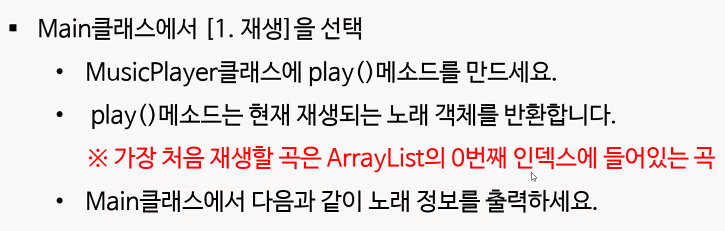
public MusicVo play() {
MusicVo m = musicList.get(currentIndex);
if(mp3.isPlaying()) {
mp3.stop();
}
mp3.play(m.getMusicPath());
return m;
}
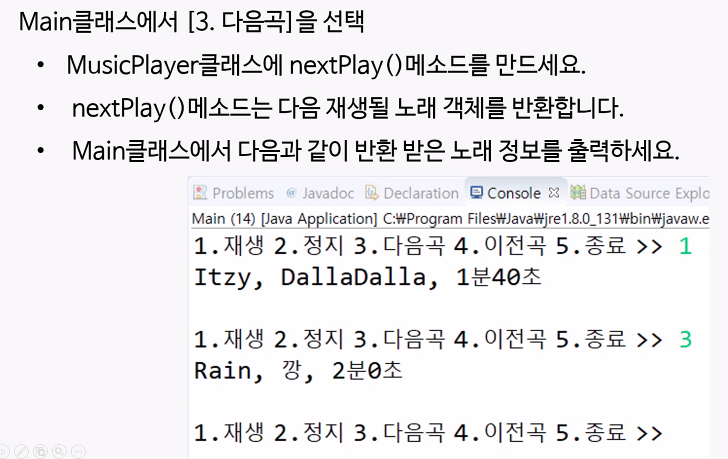
public MusicVo nextPlay() {
MusicVo m;
if(musicList.size()-1 > currentIndex) {
currentIndex++;
m = musicList.get(currentIndex);
}else {
currentIndex = 0;
m = musicList.get(currentIndex);
}
if(mp3.isPlaying()) {
mp3.stop();
}
mp3.play(m.getMusicPath());
return m;
}
public MusicVo prePlay() {
currentIndex--;
if( currentIndex == -1) {
currentIndex = musicList.size()-1;
}
MusicVo m = musicList.get(currentIndex);
if(mp3.isPlaying()) {
mp3.stop();
}
mp3.play(m.getMusicPath());
return m;
}
public String stop() {
if(mp3.isPlaying()) {
mp3.stop();
}
return "노래가 정지되었습니다.";
}
}
'ESG' 카테고리의 다른 글
| [2022년 청년친화형 기업 ESG지원 사업 - 16] (0) | 2022.09.26 |
|---|---|
| [2022년 청년친화형 기업 ESG지원 사업 - 15] (0) | 2022.09.24 |
| [2022년 청년친화형 기업 ESG지원 사업 - 13] (0) | 2022.09.22 |
| [2022년 청년친화형 기업 ESG지원 사업 - 12] (0) | 2022.09.21 |
| [2022년 청년친화형 기업 ESG지원 사업 - 11] (0) | 2022.09.20 |
'ESG' Related Articles
more

